
Contents What are Performance Max campaigns?
- What are Performance Max campaigns?
- How do Performance Max campaigns work?
- Step-by-step guide to creating a PMax campaign
- After publishing PMax campaigns, what to do next
- Pros and cons of Performance Max campaigns
- Should you use PMax campaigns?
- Frequently asked questions about Performance Max campaigns
- My conclusion on PMax campaigns
Do you want to learn everything about Performance Max (PMax) campaigns? Then you’ve come to the right place. In my comprehensive guide to PMax campaigns in Google Ads, I’ve combined all my experience and best practices to give you a complete overview.
You’ll learn how PMax campaigns work and get a step-by-step guide to creating and optimizing them with my best tips. I’ll also show you the pitfalls and risks of the campaign type and when you should stay away from it.
Are you ready? Let’s go!
The post is very detailed. If you’re only interested in one particular aspect, you can use this to navigate:
What are Performance Max campaigns?
The Performance Max campaign is Google’s fully automated campaign type that combines all Google ad networks like Search, Shopping, YouTube, Display, Gmail, Discover, and Google Maps into one campaign. Using AI, Google optimizes campaigns in real time to deliver the right ads at the best time to the right audience.
Through automation, this single campaign type can cover the entire customer journey from first contact with your business through to retargeting.
To start a PMax campaign, you first define your campaign goal. Then you upload your assets like images, videos, headlines, and descriptions, similar to a responsive display ad.
The prerequisite, of course, is a fully set-up account. If you’re right at the beginning, my Google Ads account setup helps you start cleanly.
Once the campaign is live, Google dynamically generates ads based on your assets and the set goal, and serves them across all channels. Through machine learning, Google adjusts bids and placements to maximize conversion goals.
The difference between PMax and other campaign types
Compared to traditional campaign types like Search, Shopping, or Display campaigns, PMax offers significantly more automation. That can be an advantage, but it also means you give up control.
Differences at a glance:
- Automation: PMax handles bids, ads, and placements automatically, while you manage these manually in traditional campaigns.
- Reach: PMax covers multiple channels simultaneously, while traditional campaigns are limited to individual networks.
- Transparency: With PMax you get less detailed performance data. Since mid-2025, Google has taken an important step toward more transparency with the Channel Performance Report (more on that below).
How do Performance Max campaigns work?
Performance Max campaigns use complete automation driven by Google’s AI.
The goal: Run your campaign as efficiently as possible across all Google channels like Search, Shopping, Display, YouTube, Gmail, Discover, and Google Maps, while continuously collecting data and optimizing performance.
Performance Max campaigns also use your existing remarketing audiences and serve remarketing ads. I show you how to build this data base in my dynamic remarketing setup, because PMax draws on exactly the same remarketing data.
Why is good data so important for PMax?
The AI analyzes user behavior and signals, looking for patterns. It uses this information to determine how to place ads optimally. Conversion data is the most important signal for the algorithm.
The more qualitative data your account has, the more effective the AI can work. If your Google Ads account has little conversion data, the algorithm’s decisions will be less precise, which can limit performance.
The AI adjusts bids in real time to maximize the probability of a conversion. Instead of manually setting bids, Google dynamically decides how high the bid should be for each auction. This depends on how likely it is that a click will lead to a conversion.
Google takes the work off your hands, but it also means that you have no direct control over the bids.
Components of a PMax campaign
PMax campaigns consist of several important elements you should know about.
Asset Groups
Performance Max campaigns have a different structure than normal Google Search or Shopping campaigns. The familiar structure of campaign > ad group > ad doesn’t apply here.
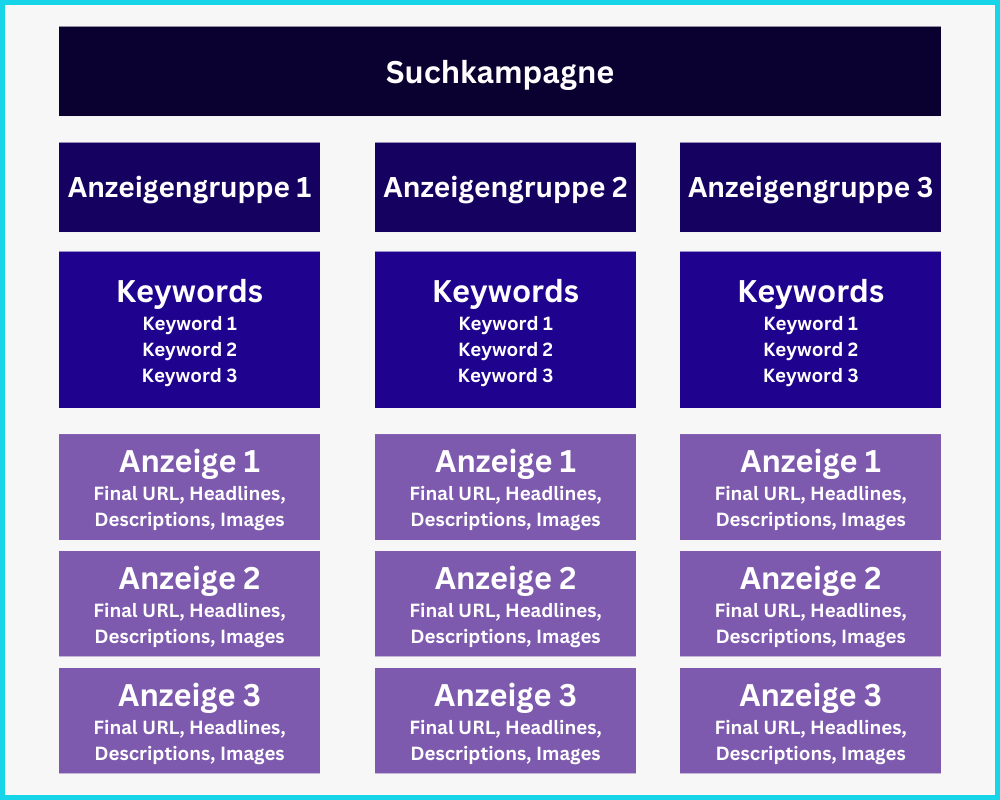
PMax campaigns don’t have ad groups and ads, but rather Asset Groups, which enable targeting and ad design on a single level.
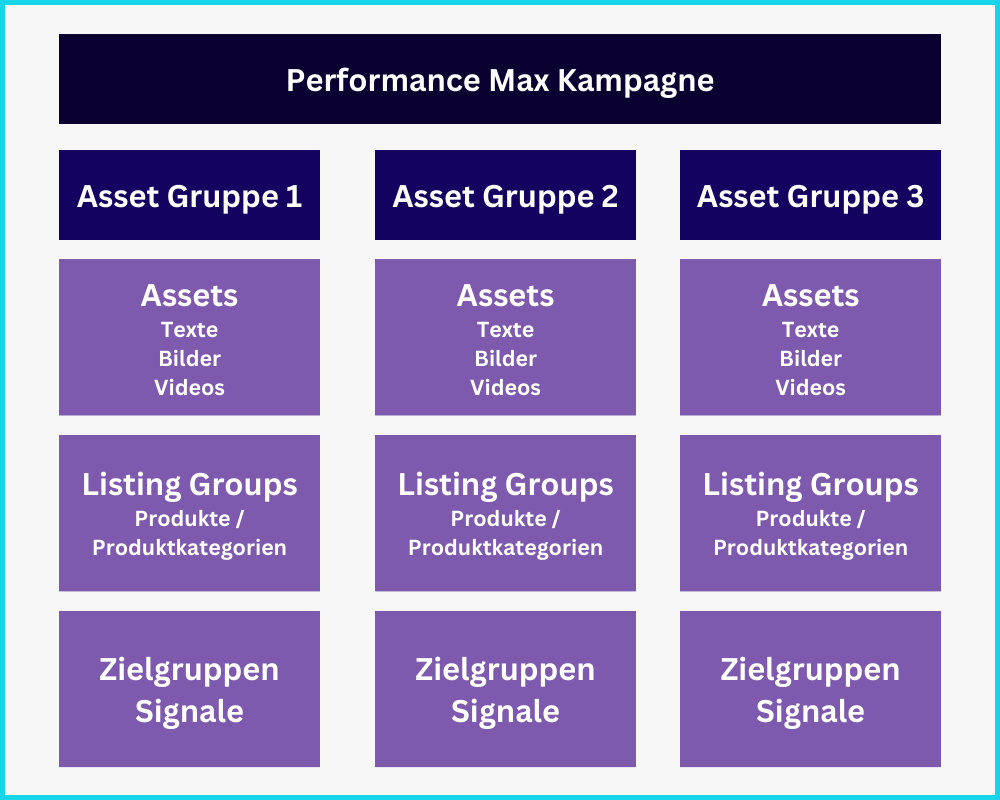
For each Asset Group, you can store assets, products from your feed, and audience signals. Let’s quickly look at the individual elements.
How do assets work?
PMax campaigns work by you providing Google with as many assets as possible. These are called assets. The algorithm combines the assets with the goal of achieving the best possible performance.
You can provide texts, images, and videos. Google generates a variety of different ad combinations from them and uses these in the various ad networks (Search, Display, YouTube, Discovery, Gmail, and Shopping for e-commerce).
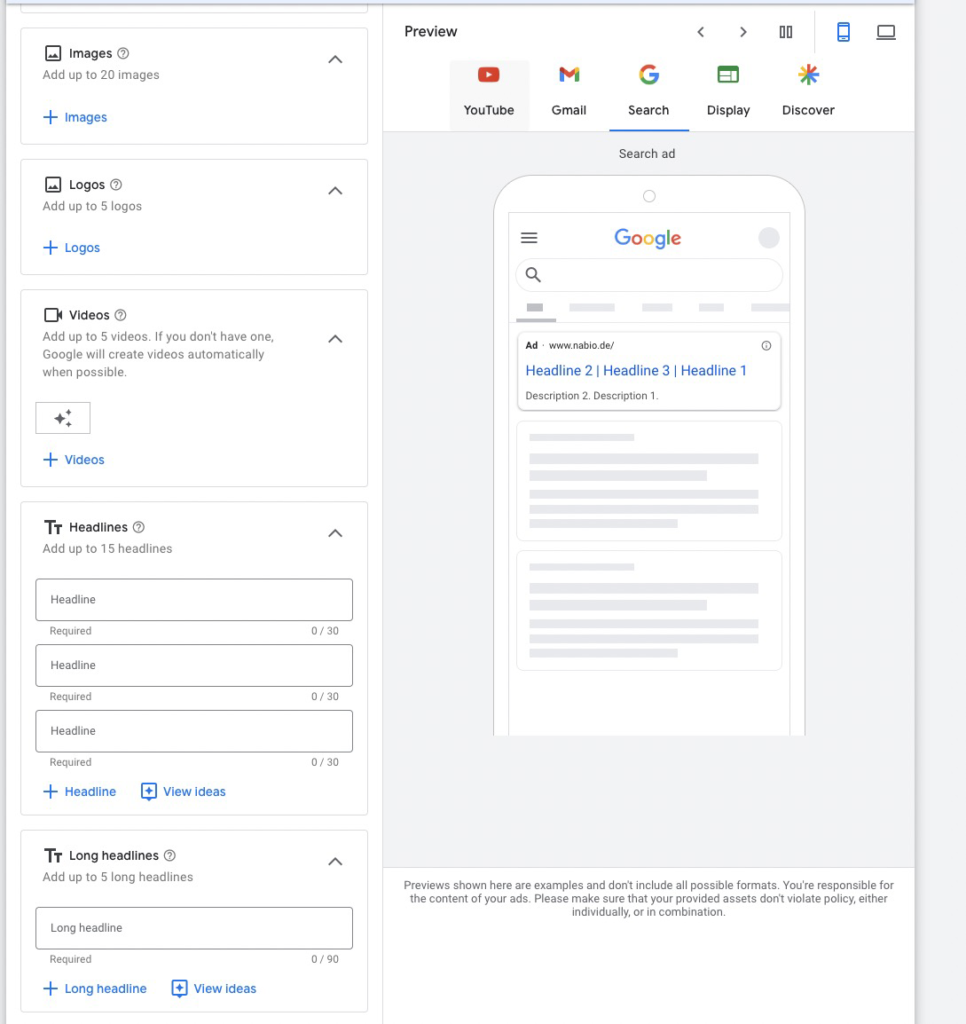
Asset types
Text Assets
- Headlines (max. 30 characters): Similar to Responsive Search Ads, you can add 15 different ones. You need at least 3.
- Long Headlines (max. 90 characters): You can add 5 long headlines. These are used for ads in the Display Network, Discovery, YouTube, or Gmail.
- Short Description (max. 60 characters): PMax campaigns require at least 1 short description.
- Descriptions (max. 90 characters): In addition to the short description, you can add 4 long descriptions.
- Business Name: If your Google Ads account is verified, you can also store the business name.
- URL: For each Asset Group, you can specify exactly 1 destination URL.
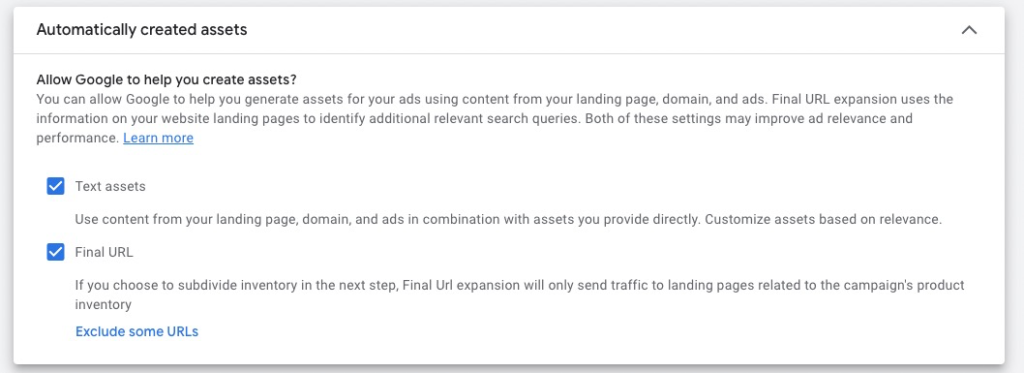
Image Assets
- Images: You can store up to 20 different images. These can be in the following formats: 1.91:1, 1:1, 4:5.
- Logos: You can also add different company logos in 1:1 or 4:1 formats.
Video Assets
In each Asset Group, you can store up to 5 different videos in different formats. There are 3 formats to choose from:
- Vertical: 9:16
- Square: 1:1
- Horizontal: 16:9
If you don’t provide your own videos, Google will likely automatically generate videos from your texts and images to use on YouTube.
Listing Groups
Listing Groups are only relevant in e-commerce. With them, you can assign individual products or product categories to Asset Groups.
This way, you can ensure that your texts, images, and videos match the advertised products. This leads to better ads and an optimized click-through rate (CTR).
To use Listing Groups, you need a working Merchant Center product feed.
Audience Signals
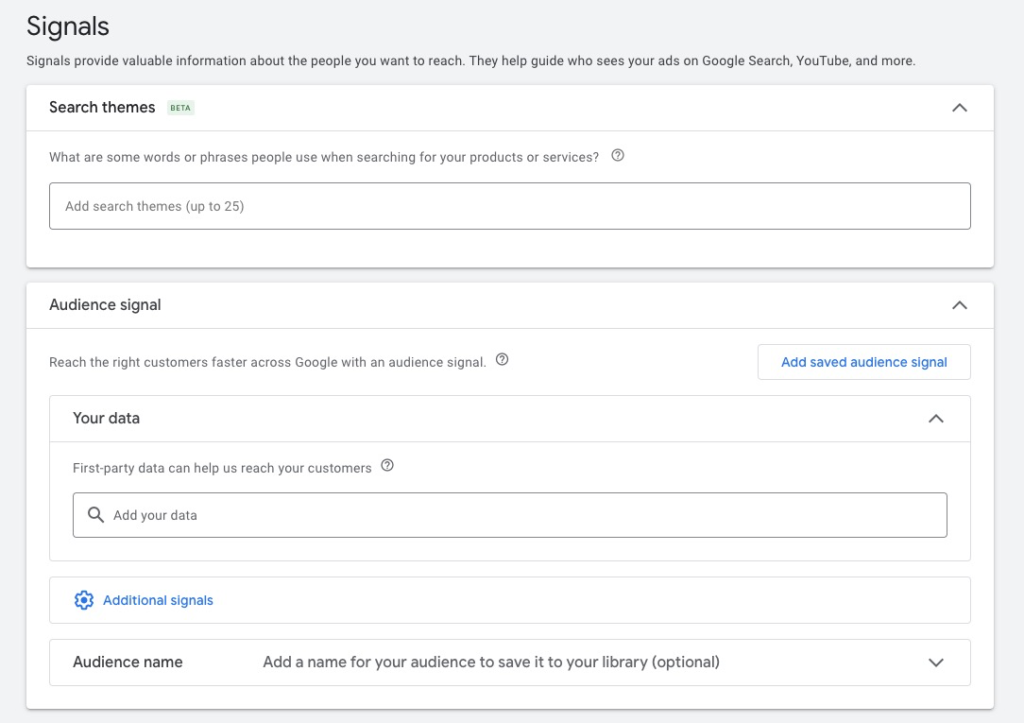
For each Asset Group, you can define audience signals. These serve as hints to the Google algorithm about who the right audience is for your Asset Group’s offer.
In its search, it will go beyond the boundaries of the defined audience signals to find users with a high probability of conversion.
The right audience signals can give you a decisive advantage. The following Google Ads audience attributes can be stored:
- Up to 50 Search Themes: Basically keywords you want to bid on. You can now store up to 50 themes per Asset Group (previously 25). Google marks each theme with a relevance rating („Very relevant”, „Relevant”, „Limited relevance”).
- Custom audiences
- Retargeting audiences
- Customer Match lists: These are based on real customer data, and Google can match them with login profiles. That makes them a particularly strong signal.
- Demographic attributes
Everything on this topic in my article on Performance Max Audience Signals.
Performance Max Targeting
PMax campaigns offer limited targeting options. You have little influence on the exact targeting of ads. As explained in the previous point, audience signals are only hints for the algorithm. It can and will address audiences outside of the audience signals.
To control ad delivery, you still have the following options:
- Geo-Targeting: You can specify in which geographic regions your ads should appear.
- Ad Scheduling: You determine the times your campaign should be active.
- Negative Keywords: Since the end of 2025, you can assign up to 10,000 negative keywords directly to a PMax campaign without contacting Google Support. More in the article PMax Negative Keywords.
- Brand Exclusions: Now possible at campaign and account level. Details in the article Excluding Brand Keywords from PMax.
Bidding Strategies
The bidding strategies are also automated, which gives you less flexibility but reduces effort. The available bidding strategies include:
- Maximize Conversions: Google optimizes bids to get you as many conversions as possible.
- Maximize Conversion Value: Google adjusts bids to maximize conversion value or revenue.
- Target ROAS (Return on Ad Spend): Google tries to achieve a specific return on ad spend that you set.
- Target CPA (Cost per Acquisition): Google optimizes bids to maximize the number of conversions at a given cost.
New Customer Acquisition as an additional bidding lever
If your scaling goal is primarily new customers, PMax has a dedicated setting called New Customer Acquisition (NCA). You can either set higher bids for new customers (value-based with a markup) or direct PMax exclusively at new customers. The prerequisite is clean New-vs-Returning tracking in the conversion setup.
More on strategic application in the article Scaling PMax Campaigns.
Performance Max Learning Phase
Every PMax campaign starts with a learning phase, which can last about 2 to 6 weeks. How long exactly depends on how much conversion data is generated. In a campaign with a high budget, the learning phase is therefore shorter than with a lower budget.
In this phase, the AI collects data on user interactions and tests different combinations of ads and audiences. It’s important to be patient during this time, as performance can fluctuate.
Details in my article on the Performance Max Learning Phase.
You want more results with Google Ads?
Get a free Google Ads Reality Check: a compact video (about 10 minutes) showing where budget is slipping away in your account and what to change.
Get your Google Ads Reality Check →
Step-by-step guide to creating a PMax campaign
Now that we’ve looked at how Performance Max campaigns work, let’s look at how to create them.
1. Add a new campaign
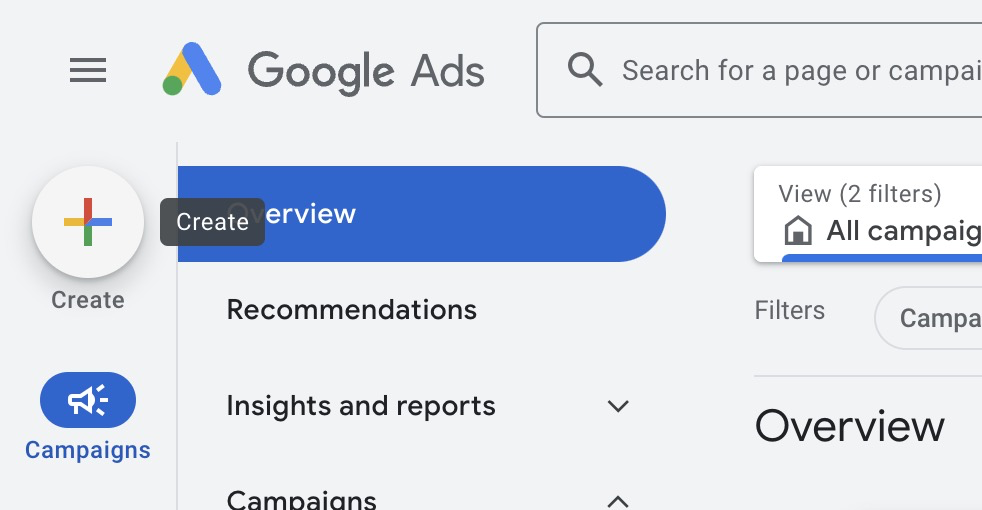
Click the plus button at the top left in Google Ads and select „Campaign”.
2. Set campaign goals
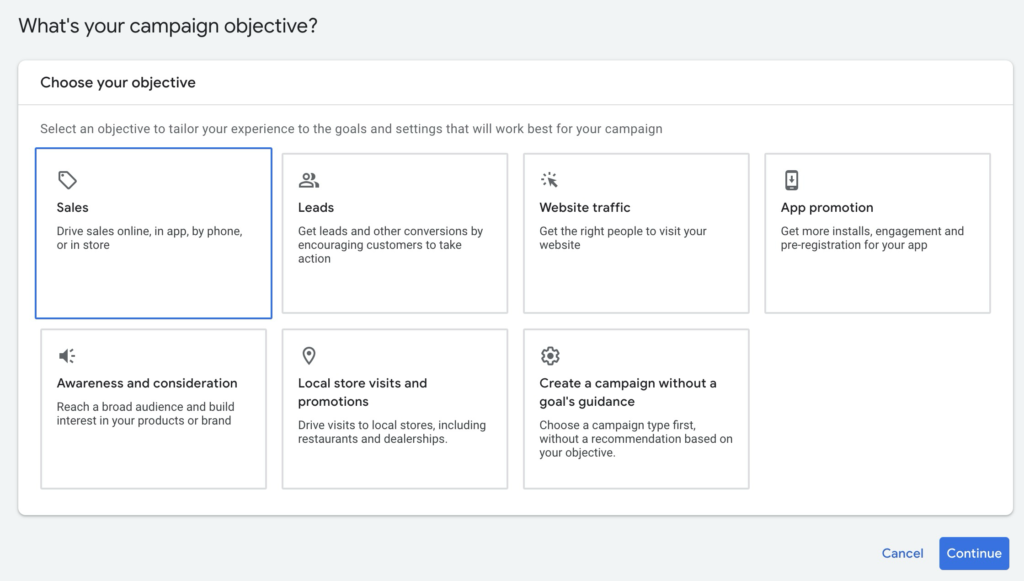
Choose the appropriate campaign goal. In my example, I’ll choose Sales.
3. Select conversions
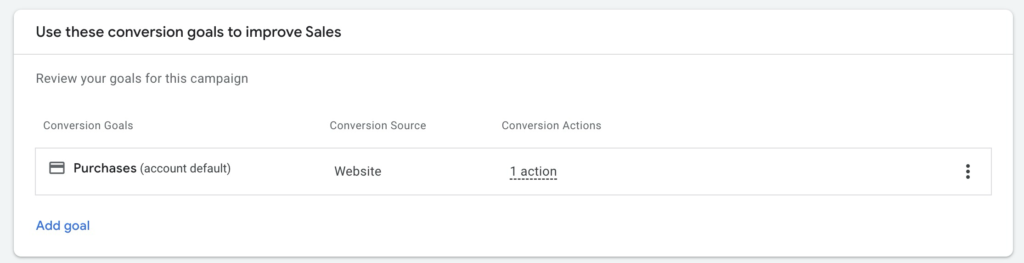
Choose the conversion actions you want to track. In our case, that would be orders or purchases.
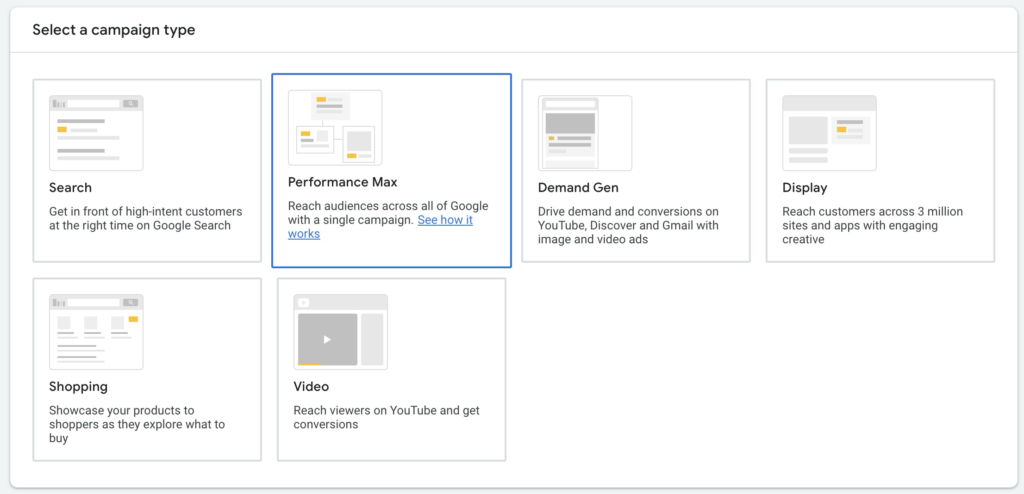
4. Select campaign type Performance Max
Now choose the Performance Max campaign type.
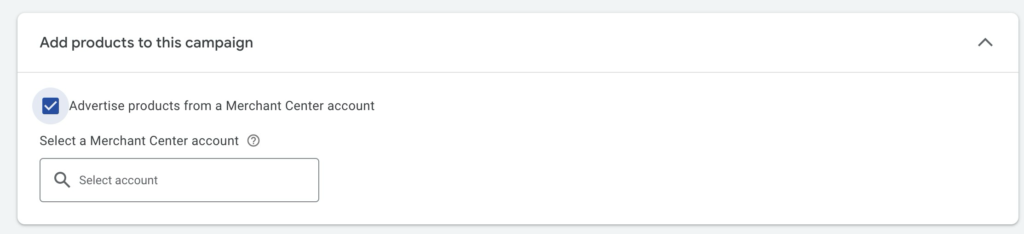
5. Link Merchant Center account
If you have a Google Merchant Center account, link it here. Only then can you display your products in the Shopping network.
Then choose a suitable name for the campaign.
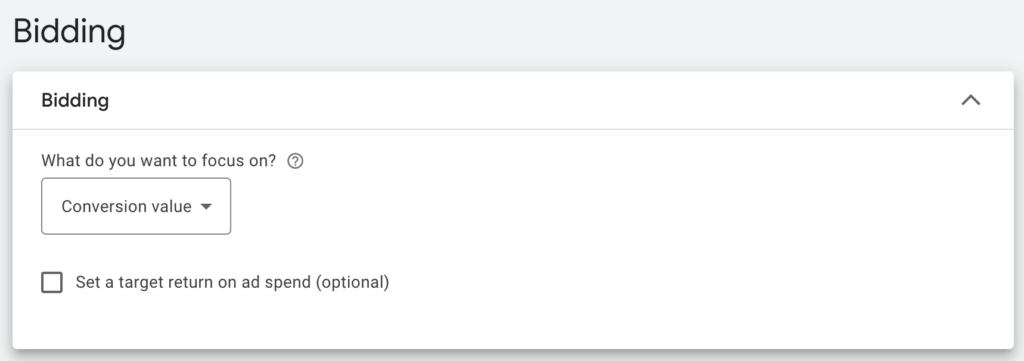
6. Select bidding strategies
Choose a bidding strategy:
- Maximize Conversions: For as many conversions as possible, mostly in lead gen.
- Maximize Conversion Value: For as much revenue as possible, mostly in e-commerce.
- Target CPA (Cost per Acquisition): Google optimizes to reach a specific cost per conversion.
- Target ROAS (Return on Ad Spend): Google optimizes to achieve a desired return.
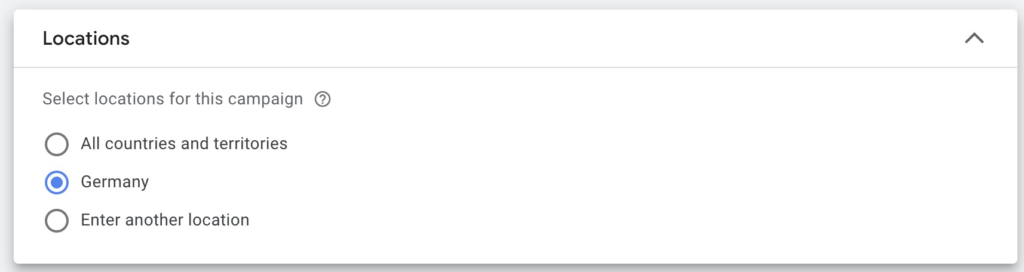
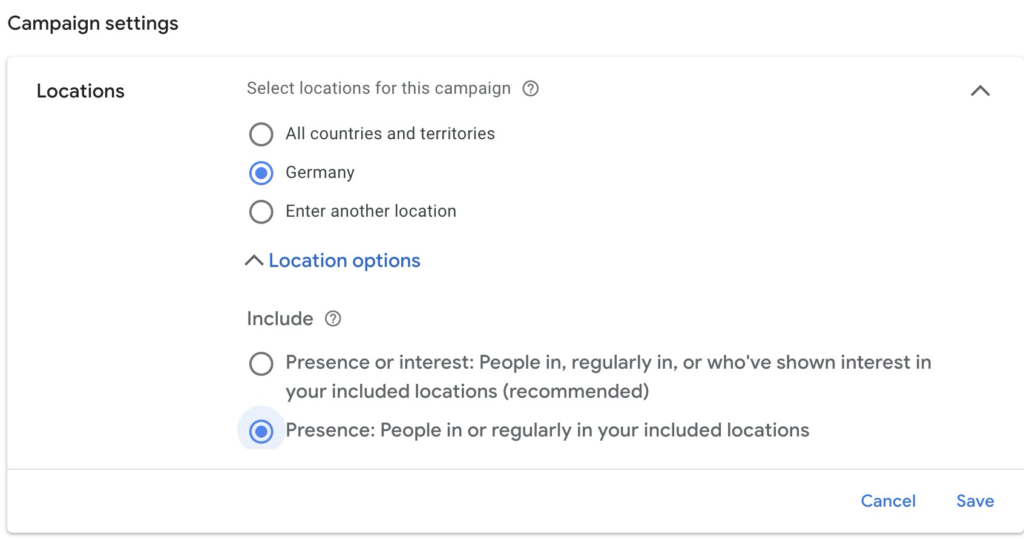
7. GEO Targeting
Determine the regions where your ads should appear. This is the most important targeting option in PMax, since other targeting options like keywords and detailed audiences are not available in the same form in this campaign type.
8. Select language
Choose the language in which the ads should appear. In many cases, it’s best not to choose a specific language, as Google’s AI decides this itself.
9. Settings for automatically generated assets
By default, Google creates automatic assets. This includes text assets (e.g., ad headlines, descriptions) and URLs.
You can decide for yourself whether you want that. If not, you have to remove the blue checkmarks here:
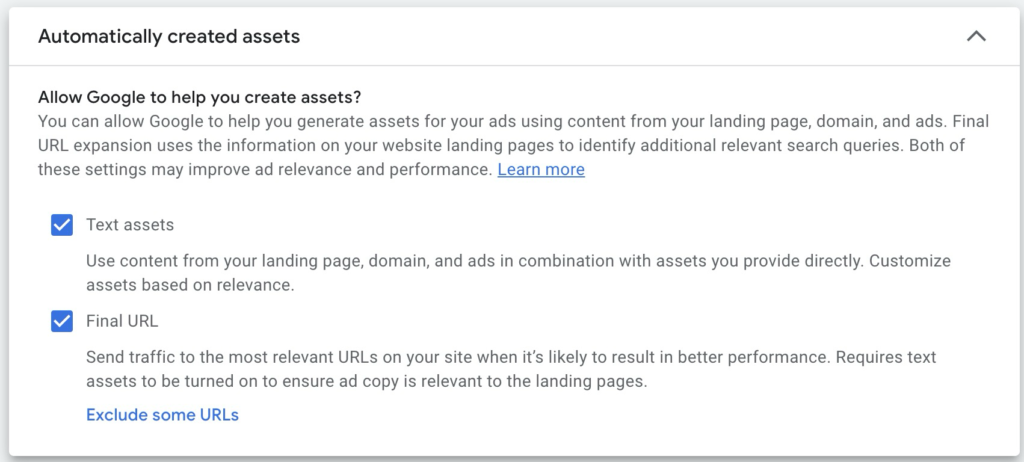
You can also exclude certain URLs to prevent them from being advertised from the start.
10. Additional settings: ad scheduling and brand exclusions
During campaign creation, you’ll find a few more important options in the additional settings:
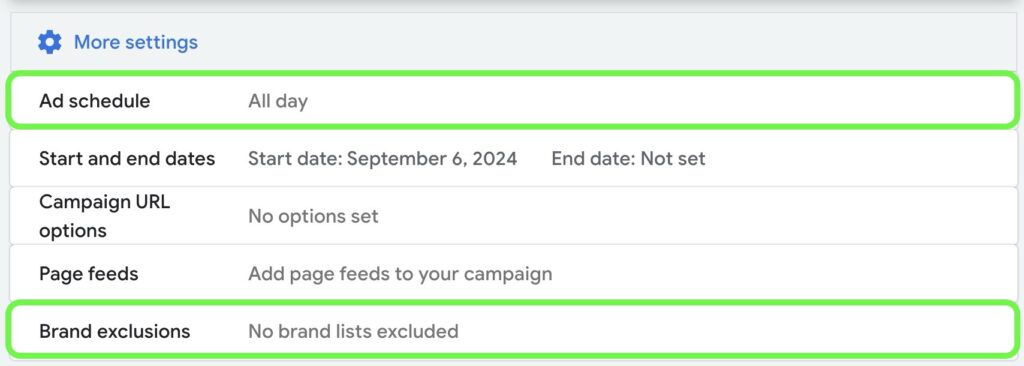
- Ad scheduling: You can set the times your ads should be active.
- Brand exclusions: PMax bids on your own brand by default. In many cases, you might not want that, as you already rank organically on your brand name. If you don’t want to bid on your own brand or competitors, you can exclude them here. Brand exclusions are now possible at both campaign and account level. More info in the article Excluding Brand Keywords from PMax Campaigns.
11. Create Asset Groups
In this step, you add your assets like images, videos, headlines, and descriptions. The assets are combined into different ad combinations that Google tests across all channels.
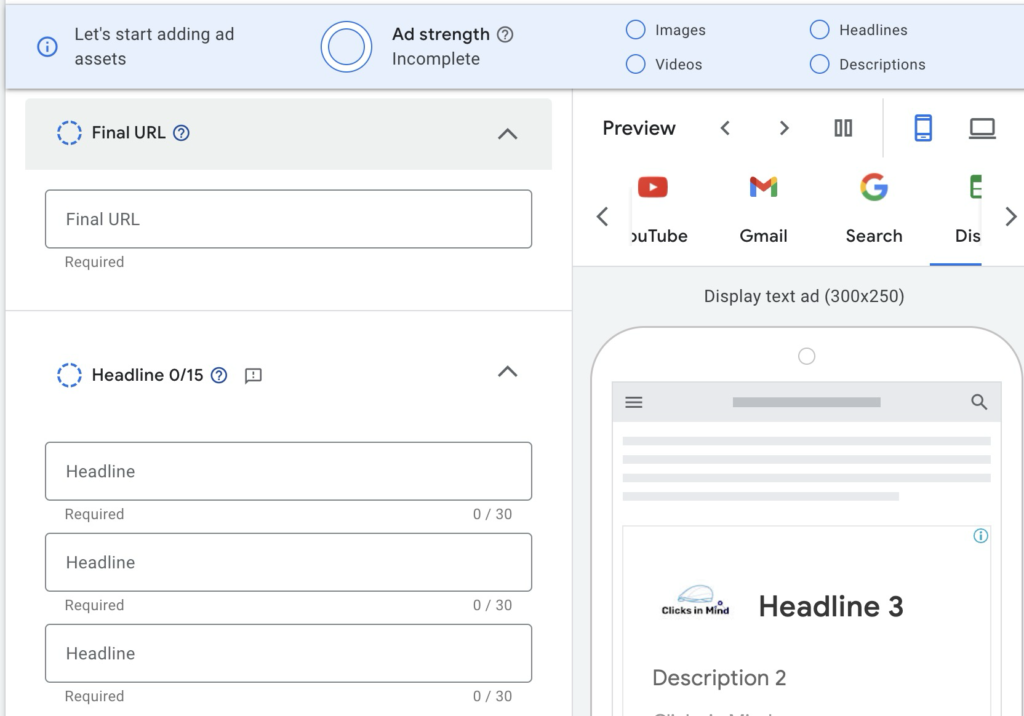
Here are some helpful tips for asset creation for Performance Max campaigns:
- High-quality content: Invest in good images and videos. The quality of the assets influences campaign performance.
- Variety of assets: Use a wide range of assets (images, videos, headlines, descriptions) to give Google more options for ad creation. This way, the AI can optimize better.
- Think about a suitable Asset Group structure: A well-structured Asset Group improves ad relevance by better covering search queries and audience needs. More on this here: PMax Asset Group Structure.
12. Add audience signals
Give Google hints about potential audiences that should see your ads.
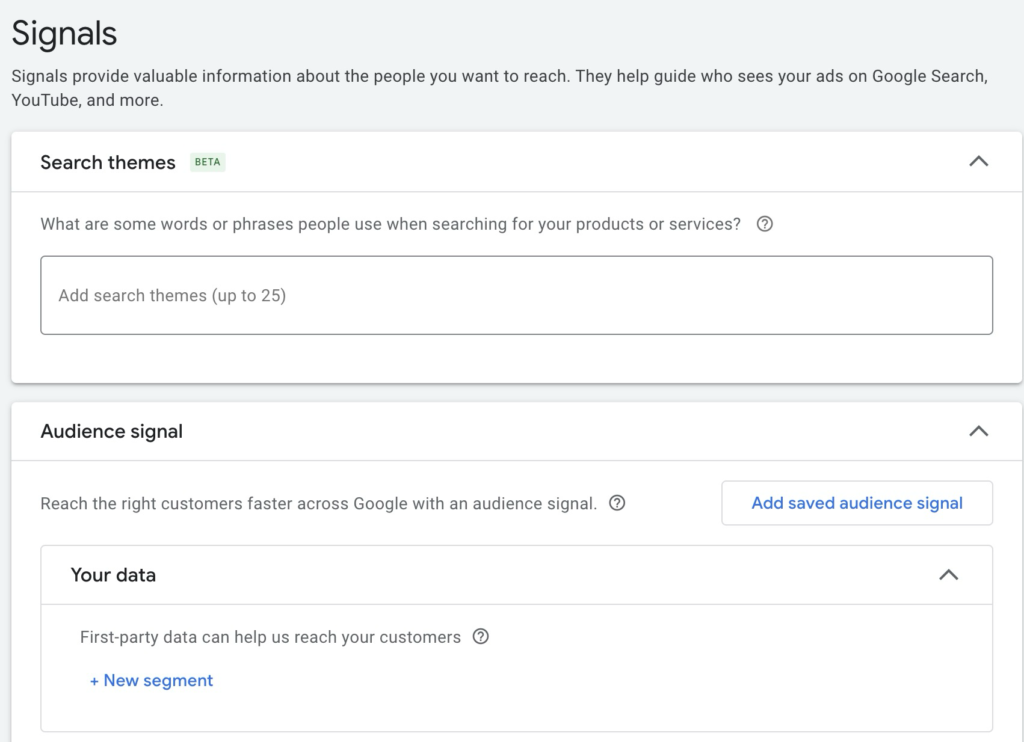
Pay attention to these 3 aspects:
- Use data: Rely on data from your previous campaigns to select suitable audiences and keywords.
- Use Remarketing and Customer Match: Integrate remarketing audiences and Customer Match lists, as these are based on real customer data.
- Precise search themes: Use specific search themes (up to 50 possible), closely related to the products or services being advertised, to minimize wastage. Quality is more important than quantity here.
Everything on this topic in my article on Performance Max Audience Signals.
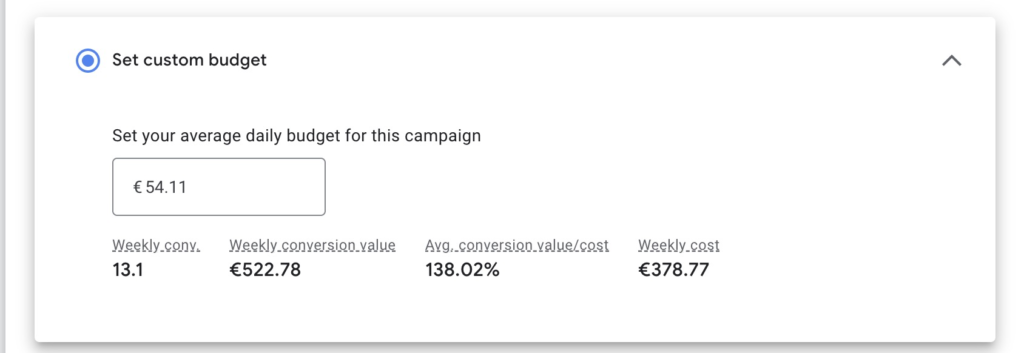
13. Set budget
Set a daily budget.
14. Publish campaign
Check all settings and click „Publish”. Congrats: you’ve now created your PMax campaign.

After publishing PMax campaigns, what to do next
After your Performance Max campaign is published, there are important steps to ensure long-term success.
1. Understanding and evaluating PMax campaigns
After publishing a Performance Max campaign, regular and well-founded analysis of campaign performance is crucial.
Evaluate overall performance
The first step is looking at the overall performance of your campaign. Don’t limit yourself to short time periods. Choose a larger period, ideally at least 30 days, to get meaningful data.
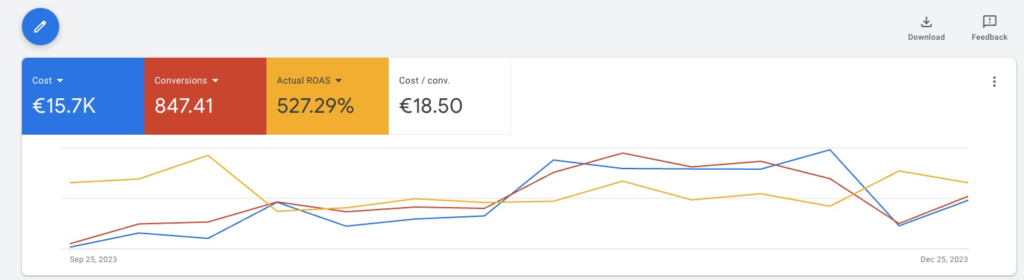
Since PMax’s AI-based automation needs time to find optimal delivery, short-term evaluations can be misleading.
Give the campaign time to get a complete picture of the results.
Pay attention to the most important key figures in the analysis:
- Cost: Is the campaign using up the daily budget?
- Conversions: How many sales or leads has the campaign generated?
- Cost per Conversion (CPA): How much does a conversion cost you on average?
- Return on Ad Spend (ROAS): How much revenue does the campaign generate relative to the costs?
Use the Channel Performance Report
Since mid-2025, there’s the Channel Performance Report in the PMax Insights tab. This lets you see how your budget is distributed across the various networks (Search, Shopping, Display, YouTube, Gmail, Discover, Maps).
Path: Open campaign → Insights → Channel Performance.
Per channel, you see impressions, clicks, conversions, and costs. This significantly mitigates PMax’s black-box problem.
More on deeper analysis in the article Analyze PMax Campaigns.
Evaluate Asset Groups and Asset Performance
Asset Groups help you segment your campaigns sensibly. You can view the performance of individual Asset Groups in Google Ads by going to the Asset Group reports in your Performance Max campaign.
Here you can switch between the standard view and the more detailed table view, in which you add specific metrics like clicks and conversions.
New since 2025/2026: You can now access the Search Terms report at the Asset Group level, not just the campaign level. This way, you see which search queries Google assigns to individual Asset Groups.
Analysis of ad asset performance
The performance of ad assets (texts, images, videos) plays a decisive role in the success of your Performance Max campaigns. Google rates the performance of each asset, once enough data is collected, in the following categories:
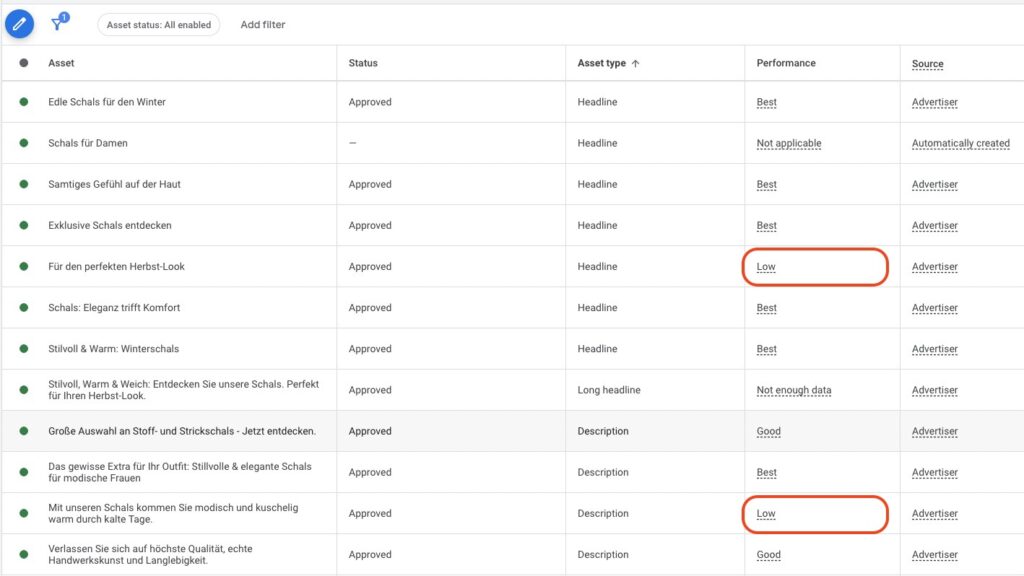
- Best: This asset has the best performance compared to others.
- Good: The asset performs well, but not optimally.
- Low: This asset performs worse than other comparable assets.
In some cases, an asset may not yet be rated („Pending”) or there may not be enough data for a rating. In that case, consider adding more assets.
A deeper asset evaluation with hard performance data is shown in the article PMax Asset Performance Analysis.
More valuable data in PMax Insights
Once enough data is collected, you can view reports on search categories, audiences, and competitors. This data shows you how the Google algorithm targets your campaign.
Search categories and search terms
Here you find data on which search categories and terms generated the most impressions, clicks, and conversions.
Audience reports with demographic depth
The algorithm identifies audiences that respond particularly well to your ads.
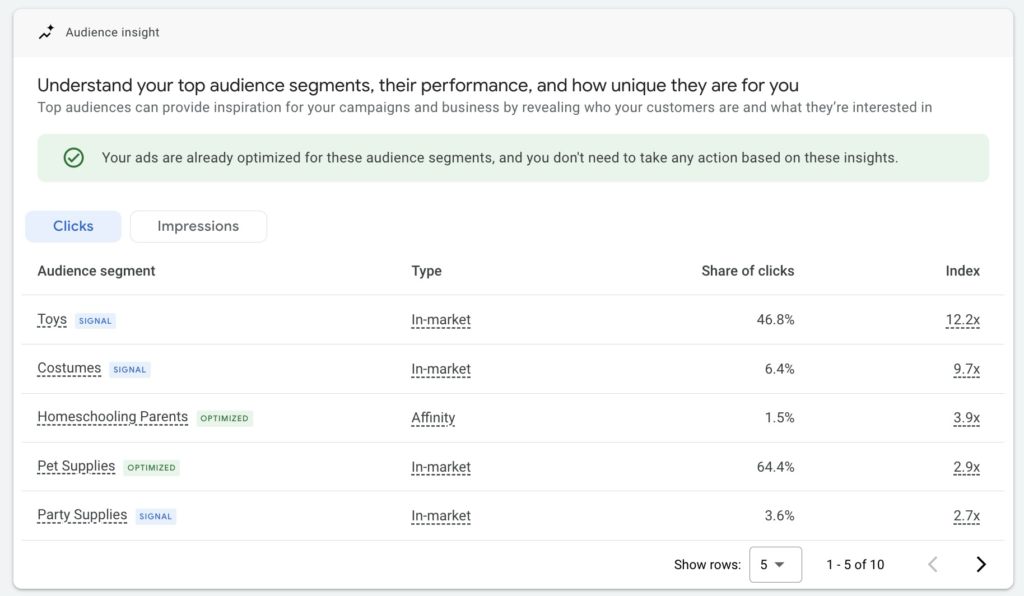
The Audience Report now offers breakdowns by age, gender, income, education, and geo data. This lets you check hypotheses about whether, for example, your PMax campaign is primarily delivering to a different audience than what you’ve stored in the signals.
For a complete guide, read my article on Analyzing PMax Campaigns.
2. Optimize PMax campaigns
Optimizing your Performance Max campaigns isn’t about tiny details, but about giving the Google algorithm the best possible data. As with any AI: „Garbage in, garbage out”, but also the opposite: „Quality in, quality out”.
This means that high-quality data and signals are the key to better results. It’s important that you give the AI time before making adjustments. PMax campaigns work best when they are optimized long-term and steadily.
Most important optimization levers at a glance
- Improve ad assets: Regularly test and improve images, texts, and videos.
- Update audience signals and search themes: Use up to 50 Search Themes, add Customer Match lists.
- Exclude brand terms via Brand Exclusions or as Negative Keywords directly in the campaign.
- Use negative keywords directly in PMax: Up to 10,000 per campaign without Google Support, since end of 2025.
- Exclude unwanted placements.
- Optimize ad extensions.
- Exclude weak regions.
- Optimize conversion data: Margins, new customers (New-vs-Returning), Enhanced Conversions.
- Pause poorly performing Asset Groups.
- Check URL extensions and landing pages.
- Adjust bidding strategy and activate NCA when new-customer focused.
- Exclude weak Listing Groups.
- Optimize product feed.
- Adjust campaign structure.
- Use the Channel Performance Report and complementary scripts like the Mike Rhodes script.
- Improve landing pages.
For more details, read my article on Optimizing PMax Campaigns.
3. Scale PMax campaigns
Scaling Performance Max campaigns means increasing the budget to achieve more conversions while keeping performance within your target values. Make small budget increases of 15-20 percent and observe for at least a week before making further adjustments.
Give the algorithm time to adjust to the new budget, to avoid short-term fluctuations.
Steps to scale:
- Wait for the learning phase: Before scaling, it’s important to wait for the full learning phase of the campaign.
- Increase campaign budget with consistently good results: When your PMax campaign delivers consistent results over at least two weeks, increase the budget in steps of 15-20 percent.
- Monitor development and adjust budget further: After each budget increase, monitor for 1-3 weeks, depending on budget size.
- Keep the conversion target range in mind: A budget increase often leads to higher cost per conversion, as the algorithm also addresses „colder” audiences.
- NCA as a scaling lever: If you primarily want to gain new customers, you can activate New Customer Acquisition.
For more details and tips on scaling, read my article on Scaling PMax Campaigns.
Pros and cons of Performance Max campaigns
Performance Max campaigns offer many advantages, but they also come with significant limitations.
Advantages of Performance Max campaigns
- Large reach: Combines the functions of multiple campaign types. You can advertise across the entire Google network with just one campaign.
- Automatic optimization: The campaign type benefits most from Google’s AI. The more data is collected, the better the campaign is optimized.
- Complete marketing funnel in one campaign: Through automation, this one campaign type can cover the entire customer journey.
- Lower effort: The high degree of automation leads to low administrative effort. It’s not about optimizing in tiny detail. You provide the strategy and support the Google algorithm with good data and content.
- High priority from Google: Google prefers PMax campaigns over Shopping campaigns.
- Better control options since 2025/2026: Channel Performance Report, 10,000 negative keywords, Search Themes limit 50, Asset-Group-level Search Terms.
Disadvantages of Performance Max campaigns
- No direct control over budget distribution: You can’t determine how much budget is distributed across the individual Google channels. With the Channel Performance Report, at least you see it after the fact.
- Limited control over keywords or targeting: Unlike traditional Search campaigns, you have no direct influence on keywords as a targeting mechanism. Negative keywords help exclude irrelevant search queries.
- Only automated bidding strategies: With PMax, you only have access to automated bidding strategies.
- Dependence on the Google algorithm: This works well when lots of data is available. With smaller budgets and less data, it gets harder for the algorithm to deliver good results.
- Lower transparency in detail: PMax still offers limited insights into some reports, although this has improved with Channel Performance Report and Asset-Group-level Search Terms.
Criticism of the campaign type
A central criticism of PMax was the complete handover of control over budget and bids to Google. As described in a Wordstream article, this was the biggest issue: Google decided how your budget was distributed, and you had limited insight into the performance of individual channels.
With the 2025/2026 updates, Google has addressed some of the criticisms. You now see channel distribution, can directly manage negative keywords, and have deeper audience data. The black-box problem isn’t gone, but it’s visibly smaller.
Those who need even more control (e.g., for very specific lead-gen setups or brand searches) sensibly continue to rely on Search or Shopping campaigns.
Should you use PMax campaigns?
The decision whether to use PMax campaigns depends on several factors. PMax is not ideal for every business, especially not as the sole support in the campaign mix and with little available data.
PMax now accounts for a significant portion of Google Ads conversions, according to industry data. As a central campaign type, PMax is hardly to be ignored, which doesn’t mean it’s the right solution for every account.
Prerequisites for successful PMax campaigns
- Historical conversion data: Your Google Ads account should already have conversion data the algorithm can fall back on. Without a sufficient data base, the AI has difficulty making sensible decisions.
- Well-functioning conversion tracking and remarketing setup: Precise conversion tracking is essential. The algorithm needs reliable information to steer the campaign properly.
- Enough time for the learning phase: PMax campaigns need a certain amount of time to find the optimal strategy.
- PMax shouldn’t be the only campaign: It’s recommended to use PMax as a supplement to other campaigns. Combinations with Search or Shopping can deliver better results, since you have more control over targeting.
What do you want to achieve?
- Ideal for e-commerce: PMax works particularly well in e-commerce because the campaigns primarily serve Shopping Ads, which can usually draw on a higher data set of conversions.
- Weaknesses in lead generation: PMax has a rather poor reputation for lead generation. This is often because targeting is too broad and lead quality suffers. It’s more demanding to generate high-quality leads.
When is PMax a good choice?
I would recommend Performance Max campaigns to you especially if you already have success with other campaign types. In that case, PMax campaigns can work optimally and maximize success.
If you have enough budget (my lower limit is 20 dollars per day) and have already collected sufficient conversion data in your account, PMax would be a good next step. With low budget and a new account, I would advise against it. Using PMax too early is one of the classic Google Ads mistakes I keep seeing with beginners.
For lead generation and very specific audiences, you should also be careful. Here PMax offers less control and can deliver unexpectedly expensive or inefficient results.
PMax Experiments as a decision aid
If you’re unsure whether PMax is the right campaign type for you, PMax Experiments help. You can run PMax directly against alternative campaign types in an A/B test logic and see which type performs better in your account. A pragmatic decision aid instead of long guessing.
Frequently asked questions about Performance Max campaigns
What’s the difference between PMax and Shopping campaigns?
Performance Max campaigns and Standard Shopping campaigns differ in reach and control. PMax extends across all Google networks like Search, YouTube, and Display, and uses machine learning to find the best placements for your ads. Standard Shopping, on the other hand, gives you more control over bids, keywords, and audiences, but is limited to Shopping ads in Google Search.
More on this in my article on PMax vs. Shopping Campaigns.
How do you exclude brand names in Performance Max campaigns?
There are two methods:
- Brand Exclusion: In the campaign settings, you’ll find an option to add a brand list. Create a list of brand names to exclude. This is now also possible at account level.
- Negative Keywords directly in the campaign: Since end of 2025, you can assign up to 10,000 negative keywords directly to a PMax campaign, including brand terms.
More in my article on Brand Exclusions in PMax.
How do you create a PMax campaign without assets (Feed-Only)?
For e-commerce, it’s possible to create a Feed-Only PMax campaign that’s based exclusively on data from the product feed and the website. This way, the campaign focuses on Shopping Ads and dynamic Display Remarketing, similar to the functionality of the former Smart Shopping campaigns.
To do that, you have to create the PMax campaign via the Merchant Center and turn off the auto-generated assets. More in the article Feed-Only PMax Campaign.
Does my PMax campaign only target the defined audiences?
In Performance Max campaigns, you don’t only target the audiences you defined. Audience signals serve as hints to the Google algorithm, but they’re not fixed targeting. Google uses these signals to start with the best audiences, but automatically expands targeting.
The real targeting control you have is GEO targeting settings, Negative Keywords (up to 10,000), Brand Exclusions, and placement/content exclusions.
More info in my article on Audience Signals.
Performance Max Troubleshooting
Sometimes issues arise, like your PMax campaign not spending the budget or not receiving impressions. These problems can have various causes, like wrong bidding strategies, budget limits, or missing audience signals.
For more details on troubleshooting, see these articles:
My conclusion on PMax campaigns
Performance Max campaigns can be a very powerful tool in Google Ads, but they’re by no means the magic solution Google likes to portray them as. It requires a well-thought-out setup and a suitable strategy. Then you’ll enjoy this campaign type.
With the 2025/2026 updates, PMax has become significantly more controllable: you see the channel distribution, can directly manage negative keywords, have up to 50 Search Themes per Asset Group, and deeper audience data. The black-box problem has become visibly smaller.
The key to success lies in providing the algorithm with high-quality data. If you continuously optimize and give the system time, PMax campaigns can achieve impressive long-term results.
I hope I could help you with this article and explain the campaign type comprehensively. If you need help, feel free to contact me via the contact form.
Work smart with Clicks in Mind
You might also like
 Performance Max
 Negative Keywords for PMax: How to Use Them Right
Add negative keywords directly to PMax, up to 10,000 per campaign. How to use the feature optimally for Search and Shopping ads.
Read more → Performance Max
 Analyze PMax Asset Performance: How to Do It in Google Ads
Here you learn where to find PMax asset evaluation, how to use Asset-Group-level Search Terms, and how to pull hard performance data with the Asset Auditor.
Read more → Performance Max
 Analyze PMax Campaigns: How to Do It (+ Hidden Reports)
Learn all the ways to evaluate your Performance Max campaigns, including Channel Performance Report, Asset-Group-level Search Terms, and demographic audience reporting.
Read more →You want more results with Google Ads?
Get a free Google Ads Reality Check: a compact video (about 10 minutes) showing where budget is slipping away in your account and what to change.
Get your Google Ads Reality Check