
Contents Optimizations for all PMax campaigns
Google’s Performance Max (PMax) campaigns offer the opportunity to automate and optimize ads across the entire Google network. However, the effectiveness of this campaign type depends heavily on proper understanding and constant optimization.
In this article, you’ll learn 16 valuable and detailed tips on how to get the most out of your PMax campaigns. From improving your assets to adjusting your bidding strategy, you’ll find everything you need to know here.
For each of these tips, you will find detailed instructions on how to proceed and all the starting points you have to optimize your campaigns.
Ready? Let’s go!
Optimizations for all PMax campaigns
Performance Max campaigns can be very helpful in both e-commerce and lead gen. The product feed needed for Shopping ads for e-commerce campaigns offers some more options for optimization.
I’m therefore dividing up my optimization tips. In the first part, you will find optimizations that are relevant for all PMax campaigns. This is followed by tips for campaigns with a product feed.
1. Improve your asset groups
The quality of your ads has a major effect on the overall campaign performance. This is because they form the actual point of contact with potential customers.
With PMax campaigns, you cannot control the exact design of the ads. The Google algorithm tries to create the best possible ads from the assets that you provide.
Your task is to constantly improve the quality of the texts, images, and videos provided. Google gives you information about which assets are clicked well and which are not.
You can find out more about this in this article: Analyzing PMax Assets.
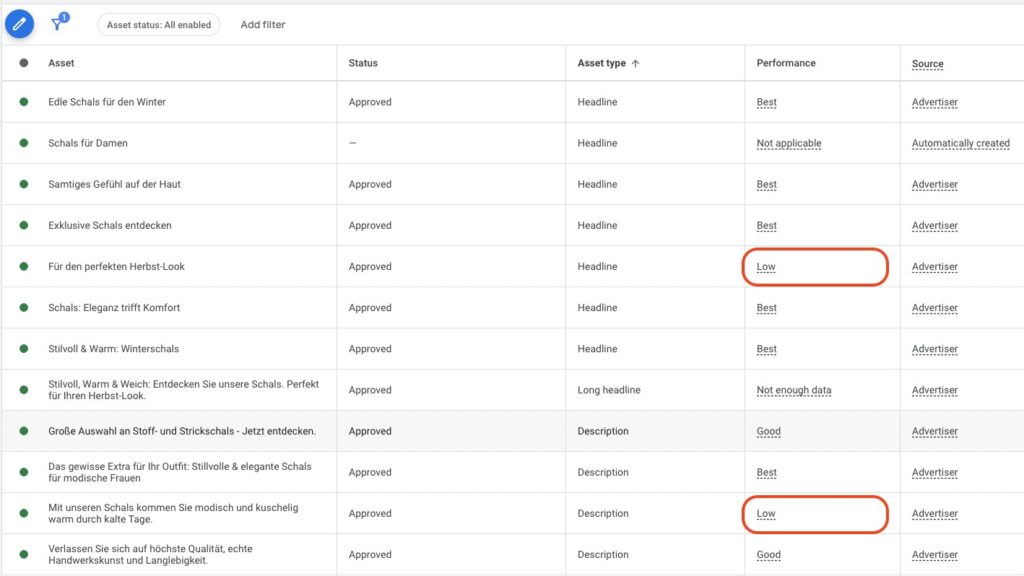
Here is a brief summary and instructions on how to do this:
- Access asset reports: Go to your Performance Max campaign in Google Ads and select an asset group. Click on „View details” to check the performance of each asset.
- Assess asset performance: Identify assets labeled „Low” and plan to replace them with better-performing alternatives.
- Replace low-performing assets: Regularly replace low-performing text, images, and videos with new content that could potentially perform better.
- Optimization based on asset combinations: Use the information about the most frequently played asset combinations to understand which content performs best together.
- Regular review: Make it a routine to review and adjust the performance of your assets at least every two weeks.
By taking this systematic approach, you can ensure that your Performance Max campaigns are constantly optimized and achieve the best results.
2. Update your audience signals and search themes
When creating a PMax campaign, you give the Google algorithm clues about the ideal target group for the respective asset groups with the audience signals. Google uses these as a starting point but also goes beyond this in its search for maximum performance.
Make sure that you define as many relevant audiences as possible. Above all, add your remarketing lists and Customer Match lists, if available. Customer Match lists are particularly strong because they are based on real customer data and Google can match them with login profiles.
Add new audiences
If your campaign has already collected enough data, you will find the audiences that have generated a disproportionately high number of impressions, clicks, or conversions in the campaign insights. In short: the target groups that respond above average to your ads.
Here is an example:
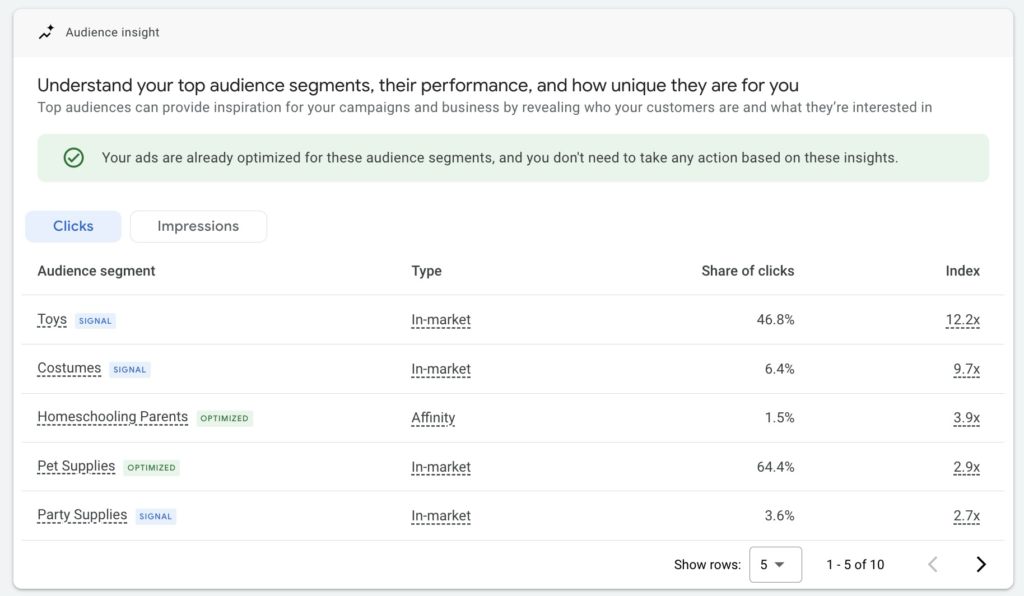
In this evaluation, you should look out for audience segments that are performing well but have not yet been added to the campaign as a signal. You can tell whether this is the case by the marking next to the target group:
- Signal (blue): This audience is already being used as a signal
- Optimized (green): This audience has been identified by the algorithm and is working well.
With the latter, you will often find audiences that are not directly related to your offer or that you have not thought of. And that is precisely the strength of PMax.
If you find new audiences in your evaluation that work particularly well, you should add them to the campaign as an audience signal. This increases the chance that the algorithm will focus even more on high-performing target groups.
In the example above, for example, I would add the „Homeschooling Parents” audience to the audience signals.
Add new search themes
Proceed similarly to the audience signals when improving the search themes. They serve as a suggestion for which search queries the PMax campaign should trigger ads.
In reality, however, the algorithm bids on a variety of more or less relevant search queries, regardless of whether you have entered them yourself or not.
You can also find an analysis of this in the campaign insights.
It is worth looking at this report regularly. Keep an eye out for relevant search terms that generate conversions and add them as search themes if you haven’t already done so.
You can now store up to 50 Search Themes per asset group. Google marks each theme with a relevance rating („Very relevant”, „Relevant”, „Limited relevance”). Check in regularly and swap out the „Limited relevance” themes for new candidates that you pull from the Search Term Insights report.
3. Exclude brand terms from the campaign
In most cases, it makes sense to exclude search queries for your brand from the PMax campaign.
This is because they can distort the results and lead to the algorithm bidding primarily on brand-related search queries, as these often promise the highest chances of success. This way, you reach interested prospects who would probably have bought from you anyway.
It is not wrong to bid on these search queries, but I would recommend that you clearly separate search queries with and without brand reference. This will make it easier for you to control how much budget is spent on your brand terms.
Exclude brand terms for PMax, how to do it
You can exclude search queries that contain your brand via the campaign settings. Scroll down to Brand exclusions.
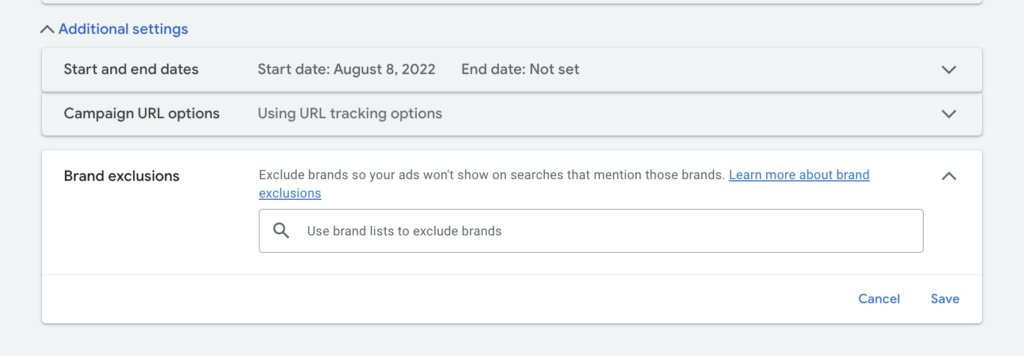
There you can add your brand or company to the list.
If your brand is not yet in Google’s list, you can add it yourself.
4. Use negative keywords directly in PMax
Since the end of 2025, you can connect negative keyword lists directly to a PMax campaign without contacting Google Support. Up to 10,000 negative keywords per campaign are possible. That makes it a very strong lever to exclude irrelevant search queries cleanly.
Here’s how to do it:
- Create an account-wide negative keyword list or use an existing one.
- Link the list to your PMax campaign via the campaign settings.
- Use Insights for ideas: Look at the keyword topics provided under Insights to identify potential negative keywords.
- Analyze traditional search campaigns: Use data from your current search campaigns to find negative keywords that don’t convert well, such as „free” or „login”.
More on the topic in the dedicated article PMax Negative Keywords.
By taking this approach, you can manage your PMax campaign more precisely and avoid wasting your budget on unwanted search queries.
You want more results with Google Ads?
Get a free Google Ads Reality Check: a compact video (about 10 minutes) showing where budget is slipping away in your account and what to change.
Get your Google Ads Reality Check →
5. Exclude unwanted placements
In your Performance Max campaigns, you can exclude unwanted placements to ensure that your ads only appear where they will bring the most value. Here are two ways you can do this effectively:
Global exclusions via account settings
Use account settings: One option is to globally exclude unwanted placements at the account level. This ensures that your ads do not appear on certain websites or in apps that are not suitable for your brand or product.
Direct exclusions in the campaign
Exclusion in the campaign: Another option is direct exclusion in the respective campaign. This gives you the flexibility to control specific placements for each campaign individually.
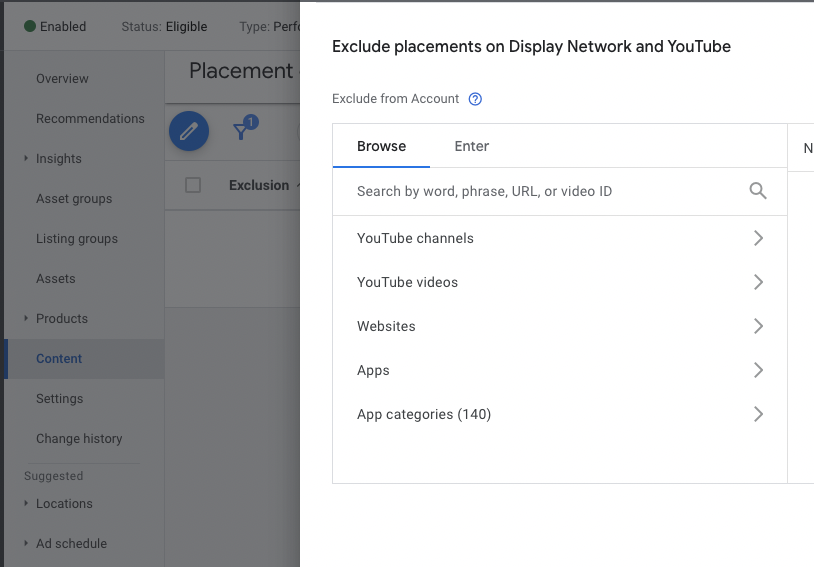
No placement data available
Unfortunately, Google does not currently provide detailed reports on the placements in Performance Max campaigns. It is therefore advisable to rely on your experience from other campaign types:
Exclude placements that have not performed well in other campaigns to use your resources more efficiently.
Exclusion of app placements
In many cases, it can be particularly useful to exclude app placements:
You can do this by excluding all app categories in the settings. This will prevent your ads from appearing in apps that may not fit your target market or target group.
Through these targeted exclusions, you can increase the efficiency of your Performance Max campaigns and ensure that your budget is spent on the most effective placements.
6. Check your ad extensions or assets
Using ad extensions, also known as assets, in Google Ads is an effective way to make your ads more eye-catching and informative. There are a total of 14 different extensions available to you. The most important ones are:
- Sitelinks: Sitelinks allow you to take users directly to other relevant pages on your website, such as an „about us” page or specific product categories. This extension has a strong visual effect and, according to Google, can increase the click-through rate by an average of 20 percent. The recommended minimum number of sitelinks is four.
- Callouts: These small information units, each 25 characters long, offer you the opportunity to emphasize sales features or important unique selling points (USPs). It is recommended to use at least eight callouts.
- Structured snippets: These allow you to highlight specific products, services, or features in a list presentation. For a bag retailer, for example, different types of bags such as clutches, handbags, or rucksacks could be listed.
- Price assets: These extensions allow you to display the prices of your products or services directly in the ad, which increases transparency and informs potential customers more quickly.
- Promotion assets: They offer an opportunity to highlight special offers or discounts directly in the ad and can significantly increase user attention and interest.
By skillfully using these different assets, you can significantly increase the effectiveness of your ads and improve interactions with potential customers.
7. Exclude regions with poor performance
One of the few aspects you still have full control over with PMax campaigns is the target region. It is therefore worth taking a look at the location reports for optimization purposes.
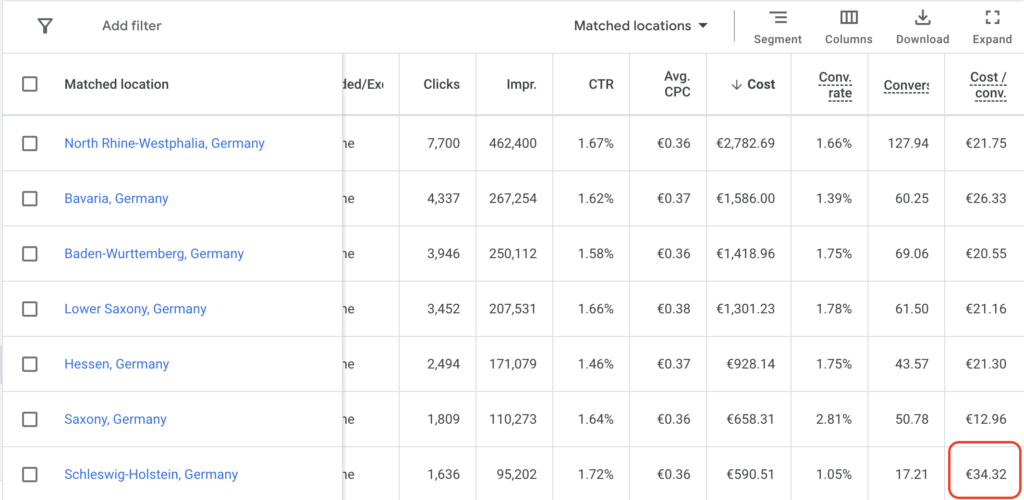
Concentrate on areas that show poor performance over a longer period of time and with significant traffic (at least 10,000 impressions).
- Analysis and decision: Regularly review the performance of your campaign by region. Identify specifically those areas that have consistently low conversion rates or high costs per acquisition.
- Targeted exclusion: In the settings of your campaign, you can specifically exclude these inefficient regions in order to use your budget more effectively.
This measure allows you to optimize your resources and focus on regions that actually deliver promising results.
8. Optimize your conversion data
Conversion tracking is essential for the success of your PMax campaigns. This is your tool to show the AI what exactly you want to achieve.
An effective Performance Max campaign requires you to give the AI clearly defined conversions. Precision is key here.
- Define the right goals: It is not enough to simply aim to maximize conversions if the real goal is to increase profits. Similarly, it is not effective to just generate a high number of leads if you need conversions that actually lead to paying customers.
- Adjust conversion goals: Correctly defining your conversions can make a significant difference to the performance of your campaigns. Therefore, regularly review your conversion goals and adjust them to ensure they reflect your actual business objectives.
- Incorporate margin and sales data: Updating conversions to include margin information or data from your sales team can be highly effective. This should be viewed as an ongoing optimization strategy and not just a one-time setup task.
- Set up Enhanced Conversions: Google’s Enhanced Conversions enable a more precise collection of conversion data. This technology uses additional user data such as email addresses or telephone numbers in encrypted form to allocate conversions more precisely.
This targeted optimization of your conversion data ensures that your campaigns not only achieve high-quality results in terms of quantity but above all in terms of quality.
9. Pause poorly performing asset groups
When optimizing PMax, it is also worth examining the performance of individual asset groups. This option is somewhat hidden, but by switching to the table view in the asset group overview, you can gain a clear insight.
Here you can see all assets and their performance metrics clearly and add additional columns for specific data as required.
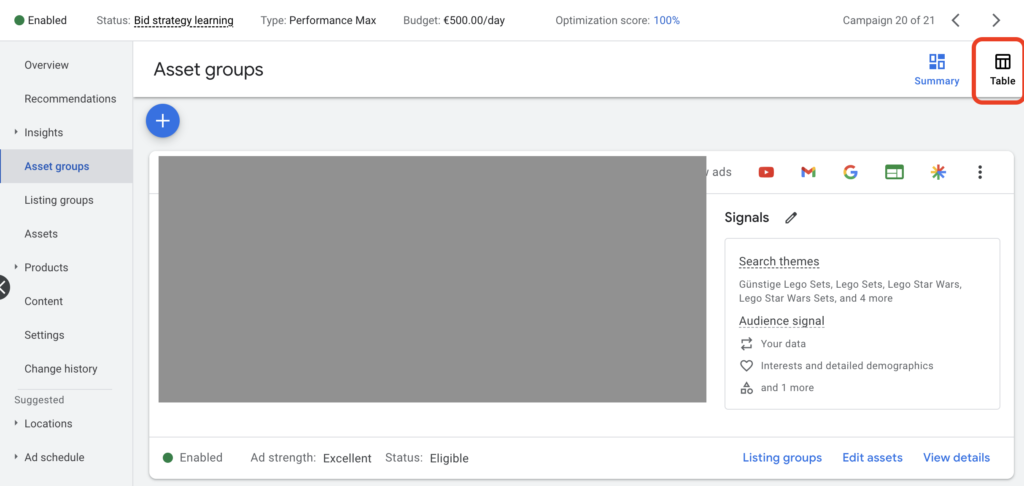
Step-by-step guide to the analysis
- Switch to table view: In the asset group overview, you can switch to table view at the top right. This gives you a detailed view of all assets.
- Check performance metrics: In this view, you can see all assets with their performance metrics. Here you can also add desired columns for specific data.
- Identify asset groups with significant traffic: Pay attention to asset groups that generate significant traffic over a longer period of time. Rule of thumb: cost > 3x average campaign CPA.
- Evaluate performance: Compare the performance of these asset groups with the average. Groups that perform significantly worse could be candidates for pausing.
Be careful when pausing
Be careful when pausing asset groups. There is a possibility that certain product groups may fall out of the promotion as a result. A careful decision is required to ensure that this does not have a negative impact on the overall performance of the campaign.
10. Pay attention to the URL extension and your landing pages
In PMax campaigns, the URL extension is enabled by default. This means that Google could potentially use other pages of your domain as landing pages for your ads.
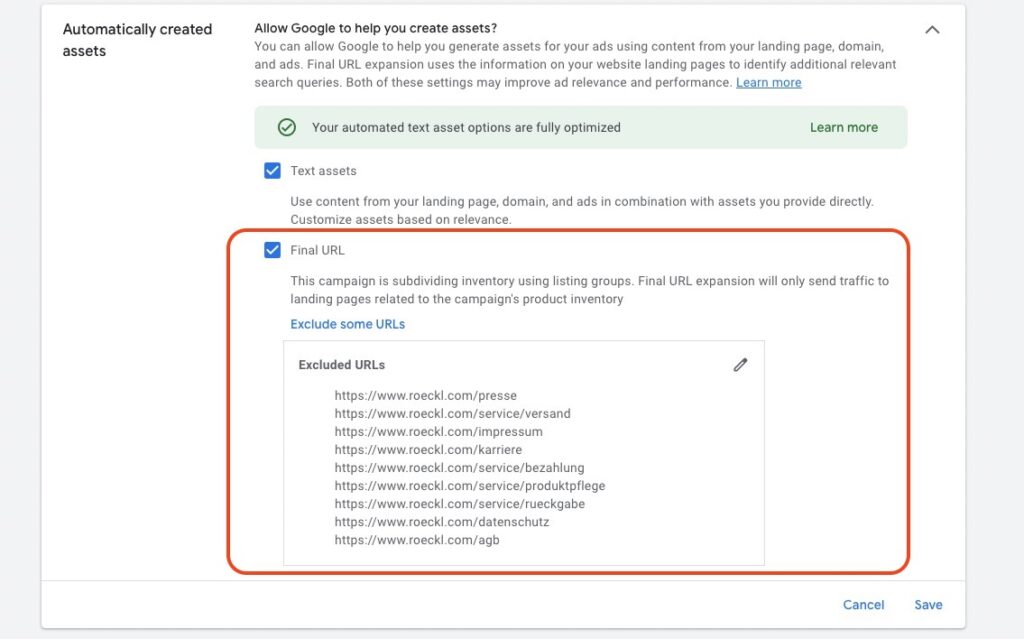
You do not necessarily have to activate this function. Especially in the lead gen area, it can make sense to only include the pages with high conversion rates.
- Analyze landing page performance via Google Analytics: As PMax does not offer direct analysis of landing page performance, it is important to use Google Analytics to gain insights into the effectiveness of your landing pages.
- Exclude weak landing pages: If there are pages that are receiving traffic from your PMax campaigns but are not performing well, you should exclude them. Also make sure that ads are not served to undesirable page areas, such as the login or imprint page.
By considering these points, you can ensure that your PMax campaigns are efficiently targeting the best-performing and most relevant parts of your website.
11. Review the bidding strategy
A big lever in optimizing PMax campaigns is the constant adjustment of the bidding strategy.
In PMax campaigns, you can choose between „Maximize Conversions” (with target CPA if applicable) or „Maximize Conversion Value” (with target ROAS if applicable).
-
Start without a defined target CPA or target ROAS: It is recommended to start without a specific target for the CPA (cost-per-acquisition) or ROAS (return on ad spend). This allows the campaign to initially learn without being influenced by these targets. You can find more information on the learning phase of PMax campaigns here.
-
Introduction of a target after stabilization: As soon as the campaign shows stable performance over a longer period of time (e.g. 6 weeks), with fluctuations of a maximum of ±20 percent, you can introduce a target. Set this target to around 20 percent above the current performance.
Example: The campaign has been consistently generating leads for more than 6 weeks (at least 30 per month) with an average CPA of $50. The CPA fluctuates weekly between $40 and $60.In this case, you set a target CPA of $60.
-
Adjustments with active target CPA or target ROAS: If you have already set a specific target for the cost per acquisition (CPA) or the return on ad spend (ROAS), proceed with caution. Only ever change your target by a maximum of 20 percent. It is important to check two things regularly:
- Budget utilization: Make sure your advertising budget is being used as intended.
- Stable performance: Your campaign should perform consistently over a period of at least four weeks. This performance should be at least 20 percent better than the previous target.
Only when these conditions are met should you consider adjusting your target by a further 20 percent.
Example: Your campaign consistently achieves a ROAS of 280 percent with an active target ROAS of 200 percent. You set the target ROAS to 240 percent. After another 4 weeks, you can raise it further if necessary.
New Customer Acquisition as a bidding lever
PMax has a dedicated setting for New Customer Acquisition. You can either set higher bids for new customers (value-based with a markup) or even direct PMax exclusively at new customers. The prerequisite is clean tracking of New-vs-Returning data, which must be set up in the conversion configuration.
Especially useful for shops with a high repeat-purchase rate, where returning customers would use organic channels anyway and the ad budget should focus more on acquisition.
By following these guidelines, you can ensure that your bidding strategy in PMax campaigns is optimally aligned and makes efficient use of your advertising budget.
Optimizations for PMax campaigns in e-commerce
In the e-commerce sector, there are further starting points for optimizing PMax campaigns via the product feed. If a product feed is available, PMax can also display Shopping ads.
In fact, the new campaign type is also Google’s preferred way to advertise products. There is of course still the normal Standard Shopping campaign.
If you want to better understand the differences between the two campaign types, check out this post: PMax vs Shopping Campaigns.
Some of the following optimization points apply to both campaign types.
12. Exclude poor-performing listing groups
Listing groups in Performance Max campaigns are used to divide your products or services into specific categories.
You can view the performance of the individual listing groups in Google in the corresponding report. If there are groups that stand out negatively, you can exclude them:
Exclusion criteria: If a listing group is performing well below average after at least 5,000 impressions, it is advisable to exclude it. This allows you to allocate your budget more efficiently to the groups that deliver better results.
13. Optimize the product feed
The product feed is extremely important for the success of your Shopping ads. The ads are automatically created by Google based on the existing product data.
Optimizing the product feed is therefore essential. A comprehensive, up-to-date, and relevant feed is essential.
Important product identifiers
You should pay particular attention to the following identifiers to tell Google exactly what you are selling:
- Brand name: Clearly represents the brand of your products.
- Manufacturer part number (MPN or SKU): Unique number to identify your products.
- UPC code (also known as GTIN): Used worldwide for product identification.
- Meaningful titles: Ensure clarity and attractiveness of your products.
- Google taxonomy/categorization: Helps to classify your products into the right categories.
- Product type: Defines the type of product for better categorization.
- Price
These identifiers are not only crucial for the smooth functioning of your campaigns, but also contribute significantly to optimization and thus to better results.
High-quality product information
- Detailed descriptions: Make sure that every product description is detailed, unique, and SEO-optimized. This not only increases visibility in search engines but also addresses the needs and questions of your target group.
- High-resolution images: Use high-quality images that show your products from different perspectives. Images are often the first impression potential customers get of your products.
Data feed management solutions
Using a data feed management solution can be crucial to fully exploit the potential of your e-commerce advertising. Such tools facilitate and automate feed management.
Especially in complex e-commerce sectors, these tools can offer a significant advantage.
14. Optimize your campaign structure
An effective campaign structure is crucial for e-commerce success. Here are some key elements for optimization:
Product allocation
Firstly, it is important to review the allocation of products to existing campaigns.
There is a risk that Google will focus on products that sell well, neglecting other products that may be more important to the long-term success of the business.
To do this, regularly check the product reports.
In most cases, it makes sense to divide the products into campaigns by category. This makes it easier to manage the budget for each category.
Strategic segmentation
One possible strategy is to divide products according to certain criteria such as price, performance, or margin.
This segmented approach allows you to set a customized target ROAS for each product group. For example, you could promote higher-priced products or those with a higher margin more aggressively to better achieve your business objectives.
Catch-All Campaign
Add a catch-all campaign to include products that are not included in other campaigns. This campaign ensures a broad market presence but should be carefully monitored to maintain balance with specialized campaigns.
By taking these steps, you can ensure that your campaigns work efficiently and contribute maximally to your company’s success.
Additional tips for PMax optimization
In addition to traditional campaign optimization, there are other tips that can help you better understand your PMax campaign and improve performance.
15. Channel insights: Channel Performance Report and Mike Rhodes script
Performance Max (PMax) campaigns can seem like a black box, as it’s often unclear which Google network is generating the most impressions. By now, there are two tools that give you transparency: the native Channel Performance Report and the script from Mike Rhodes.
The native Channel Performance Report
PMax distributes your ads across Search, Shopping, Display, YouTube, Gmail, Discover, Maps, and Partners. The Channel Performance Report shows you impressions, interactions, and conversions per channel. That way, you can see whether your budget lands where it converts, or whether a specific channel disproportionately eats spend without performance.
You’ll find the report in the PMax campaign under „Reports” or directly in the Insights overview. This is the quick check for every active PMax campaign.
Mike Rhodes’ PMax script for deeper insights
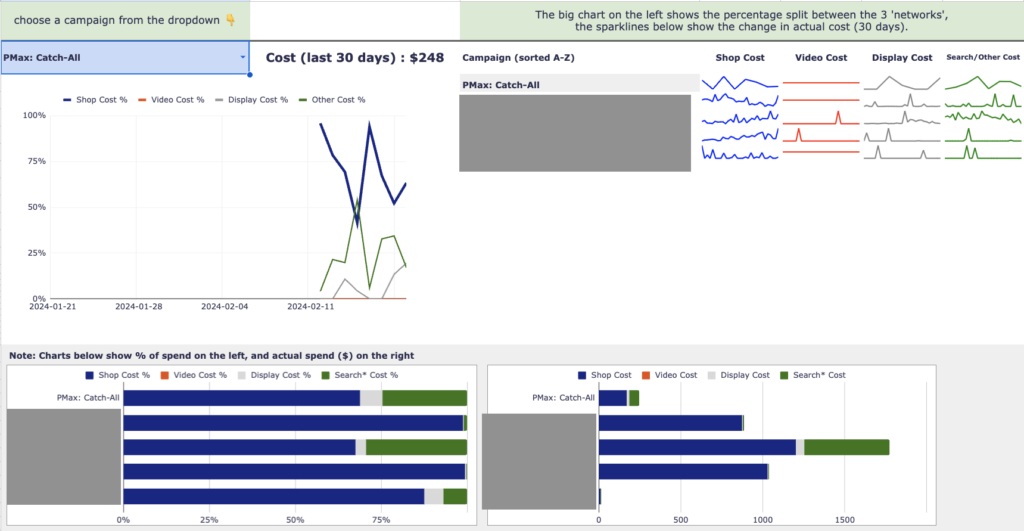
If you want to dive deeper and see individual asset groups per channel, the PMax Insights script from Mike Rhodes is the complementary option. You’ll find it on GitHub. The script generates an automatically updated report in Google Sheets:
- Distribution analysis: See exactly where your ads are being served within the Google network.
- Asset group performance: Get detailed information about the performance of individual asset groups.
- Product performance: See at a glance which products are performing well and which are not being used at all.
- Search term analysis: Get a clear overview of the search terms associated with your ads.
By the way: You can find even more helpful PMax scripts in this post.
16. Improve your landing pages for better performance
Optimizing your landing pages is a key factor in the success of your PMax campaigns. Google scans your website and uses the data collected to feed the algorithm.
The more precise and relevant the information on your pages is, the better the algorithm can understand which target group your offer is best suited to.
Content optimization
The content of your website not only influences how the algorithm understands your offer but also the automatically generated ad copy. By default, PMax uses the content available on your website to generate text assets.
Therefore, make sure that the texts on your landing pages are clear, precise, and tailored to your offer to enable effective ads.
Page speed and conversion optimization
In addition to content, the technical performance of your website also plays a decisive role. A fast page speed ensures that visitors are not put off by long loading times.
The conversion strength of your website is also important. Intuitive navigation, clear call-to-actions, and an optimized user experience make it easier for visitors to find their way to a purchase.
By optimizing your landing pages in these areas, you can not only improve the performance of your PMax campaigns but also optimize the overall user experience on your website, which leads to a higher conversion rate and better ROAS.
Final words
I hope this post has shown you that there are a few things you can do to optimize your Performance Max campaigns.
It’s less about very small details and more about providing the Google algorithm with the best possible data.
As with any AI: „Garbage in, garbage out”.
But of course, the exact opposite also applies:
„Quality in, Quality out”
If you improve the quality of the input, the results will amaze you.
It is very important in all of this that you give the AI time after making changes and don’t jump to conclusions. You should always see PMax campaigns as long-term assets that slowly and steadily improve.
Thank you for reading this article so far. I hope I have been able to help you. Now have fun optimizing and reaching maximum performance.
Work smart - Clicks in Mind
You might also like
 Performance Max
 Negative Keywords for PMax: How to Use Them Right
Add negative keywords directly to PMax, up to 10,000 per campaign. How to use the feature optimally for Search and Shopping ads.
Read more → Performance Max
 Analyze PMax Asset Performance: How to Do It in Google Ads
Here you learn where to find PMax asset evaluation, how to use Asset-Group-level Search Terms, and how to pull hard performance data with the Asset Auditor.
Read more → Performance Max
 Analyze PMax Campaigns: How to Do It (+ Hidden Reports)
Learn all the ways to evaluate your Performance Max campaigns, including Channel Performance Report, Asset-Group-level Search Terms, and demographic audience reporting.
Read more →You want more results with Google Ads?
Get a free Google Ads Reality Check: a compact video (about 10 minutes) showing where budget is slipping away in your account and what to change.
Get your Google Ads Reality Check