
Contents What are audience signals?
Audience Signals are important building blocks of a Performance Max (PMax) campaign in Google Ads. There’s often confusion about how they work. If you have question marks too, you’re in the right place.
In this post you’ll learn everything you need to know about audience signals.
In short: Audience signals are one of the most important features of Performance Max campaigns. They serve as hints for the Google algorithm and help direct the ads so they reach the best possible audience.
However, they are not real control, but only a way to influence the automated targeting.
What are audience signals?
Audience signals serve to give the Google algorithm relevant audience segments for the asset group of a PMax campaign. They are based on user properties and behavior patterns.
The provided signals then serve as the basis for the automatic targeting of the campaign.
It’s important to understand: Audience signals are only a hint to the algorithm about which audiences can be addressed with the campaign. You can’t use them to control who actually sees your ads.
Here’s a small graphic for illustration:
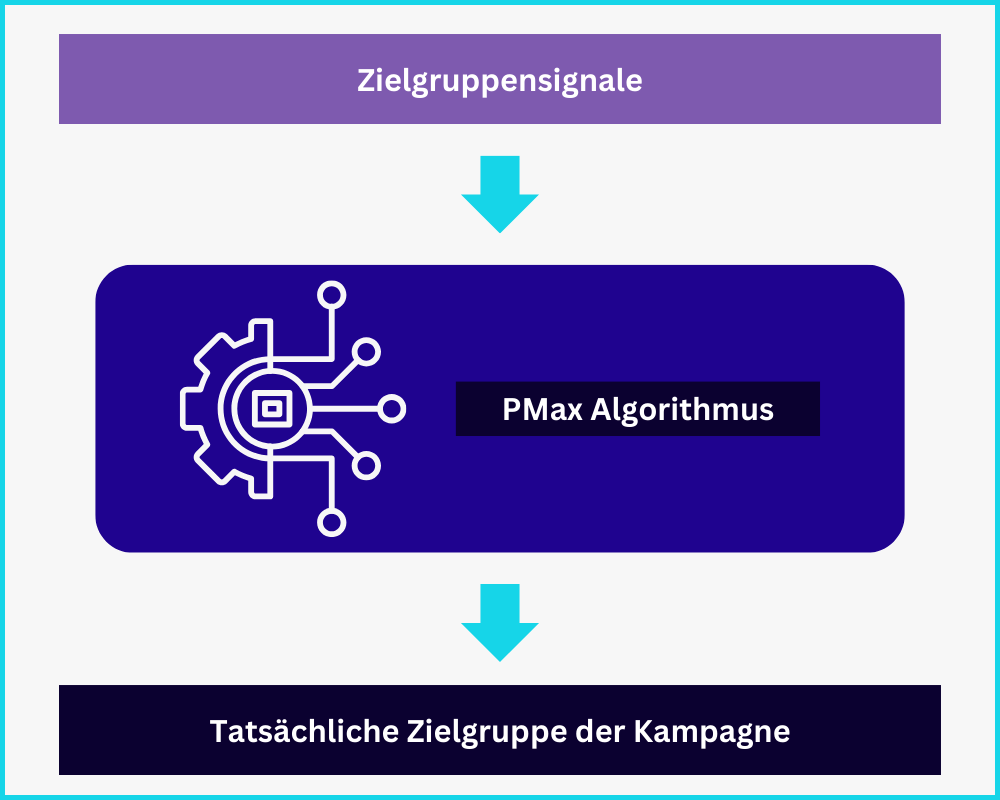
Within a Performance Max campaign, you can store separate audience signals for each asset group.
Audience Signals are not real audience targeting
At the risk of repeating myself: Audience signals don’t work like the audience targeting we know from other campaign types like Display.
They are only a hint for the Google algorithm so it doesn’t have to start from scratch when looking for the best audiences. The algorithm can and will go beyond the defined boundaries and also address audiences not included in the signals.
These audience signals exist
Performance Max campaigns are constantly evolving. There are now two signal types:
- Search Themes
- Audience Signals
What’s behind that?
Search Themes
Since Performance Max campaigns are mainly active in the search network with Search and Shopping ads, the right search queries or keywords play an important role.
To signal to the algorithm which search queries are relevant for your offer, you can store up to 50 different search themes in each asset group (the limit was raised from 25 to 50 in 2025).
By now, Google marks each theme with a relevance rating: „Very relevant”, „Relevant”, „Limited relevance”. It’s worth regularly replacing themes marked as „Limited relevance”.

Audience Signals
Besides search themes, you can specify audience segments relevant for the offer in the respective asset group.
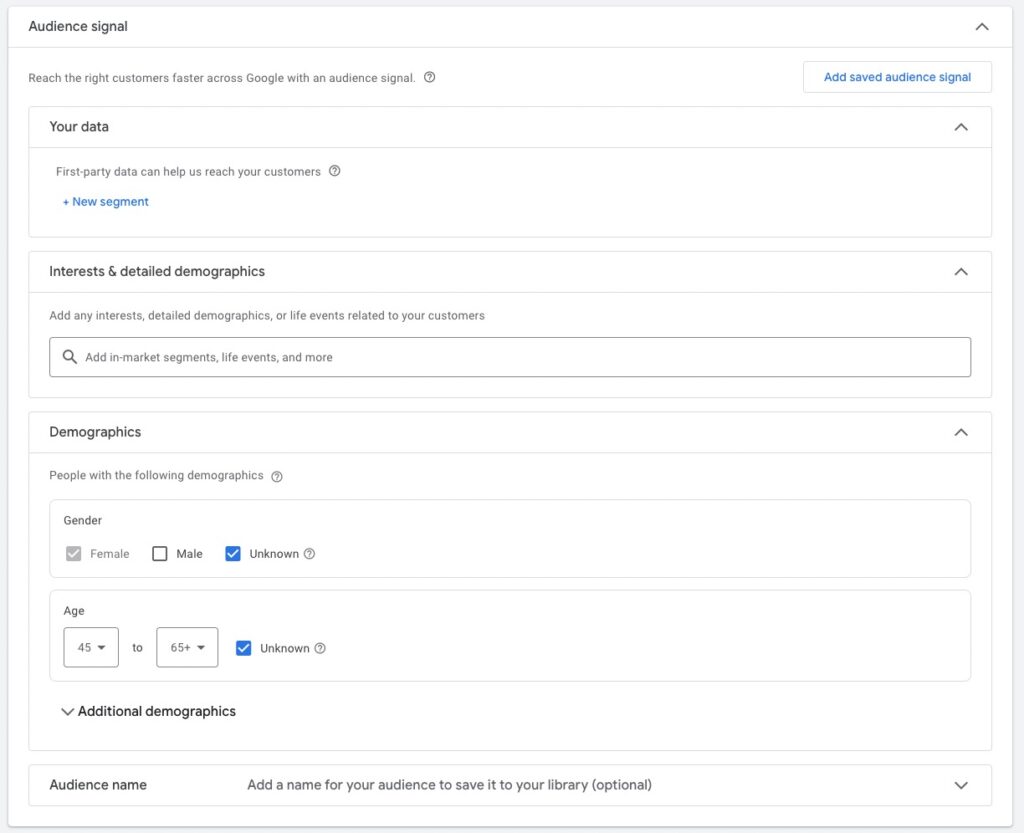
The following categories exist:
- First-party data: Here you can select audiences that have already interacted with your website. These can be remarketing lists (Google Remarketing Tag or GA4 required) or Customer Match lists (more on that in a moment).
- Interest audiences: Here you can select predefined segments created with Google’s large data set. The segments are divided into 4 categories. You can also create custom segments based on user properties.
- In-Market audiences: In this category, users are categorized based on their recent purchase intent.
- Life Events: Here you can reach users at important life events like moving, graduation, or marriage.
- Detailed demographics: Here segments are based on long-term factors like marital status, education, or employer.
- Affinity: Segments based on long-term habits or general interest. Unlike In-Market audiences, no acute need needs to exist.
- Demographics: The familiar demographic targeting options gender, age, parental status, and income.
Customer Match lists as the strongest first-party signal
Customer Match lists deserve their own block because they’re the strongest available signal type. They are based on actual customer data (email, phone number) that you upload to Google Ads. Google matches these with login profiles of its users to build a valuable audience.
Customer Match lists have two advantages over other signal types:
- High-quality data basis: You tell Google explicitly „these people are my customers” instead of defining them via behavior proxy.
- Cookieless-stable: Since the match runs via Google login, Customer Match isn’t dependent on third-party cookies.
Prerequisites: First-party data in sufficient quantity (Google names 1,000 as minimum, ideally 5,000+) and Customer Match program activated in the account.
The advantages of audience signals
Using audience signals in Performance Max campaigns is optional. The campaigns can also work without them.
But with the right signals, you can give the Google algorithm a head start and reach the relevant audience faster and more targeted.
Here the most important advantages:
-
More precise targeting: When you add audience signals, you give the algorithm important data points about who your optimal audience is from the start. Without such signals, Google has to analyze your website and assets itself. A wide range of different audiences is tested, which can lead to irrelevant traffic.
-
More efficient campaigns: With the right signals, you can better influence which audiences PMax addresses. This reduces the probability that your budget is spent on non-performing audiences. There’s no guarantee.
-
Automated targeting: Audience signals serve the algorithm as a starting point for its own search for the best audiences. If you add audiences you know already work well, Google can dive deeper from there and collect more detailed user signals.
Setting up audience signals correctly, 4 helpful tips
Generally, audience signals are about defining the best possible audience for the respective asset group. Ideally, texts, images, videos, and products should match the selected audience.
Rule of thumb: Add all suitable search themes and audience properties.
1. Use your data
When setting up audience signals, you shouldn’t build on your own assumptions, but use the data from your account.
Look at which audiences, demographic properties, and keywords have worked well in your other campaigns, and add them to the PMax campaign.
2. Use the power of remarketing and Customer Match
Performance Max campaigns don’t just operate across the entire Google network, they also function as a remarketing campaign.
As one of the most important audience signals, you should add your remarketing audiences and Customer Match lists.
These audiences are particularly effective because they contain exactly the users who have already interacted with your business or bought from you. That helps Google better understand the properties of your ideal customers.
You can store these signals in each of your audience signals.
By the way: Here you learn everything about the setup for dynamic remarketing.
3. Use precise search themes, don’t max out all 50
For each asset group you can specify up to 50 different search themes. Pay attention that the stored search themes aren’t too generic.
In this case, only use search themes that are relevant for the product group:
„Running shoes for women”, „Women’s running shoes”, „Jogging shoes for women”, „Athletic shoes women”
Avoid generic search themes like „shoes”.
Focus on quality, not quantity. You don’t have to specify all 50 terms. And use the relevance rating Google gives you as feedback: terms marked as „Limited relevance” after a few weeks should be replaced with new candidates.
4. Create custom segments
Besides the predefined audience segments, you can also create your own segments tailored exactly to your offer in Google Ads.
You find this option in audience signals under Interest Audiences:
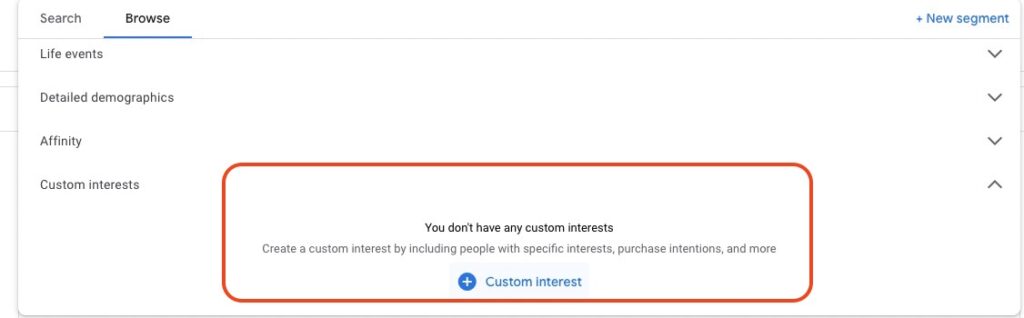
If you haven’t created a segment yet, click the blue plus.
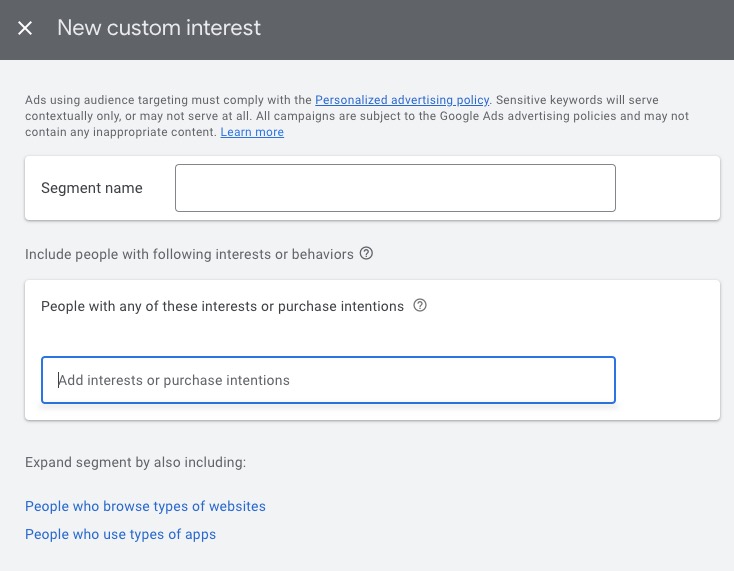
For Performance Max campaigns there are 3 properties:
- Interests and purchase intents: Similar to search themes, you can enter terms the audience segment is interested in.
- People who visit types of websites: Here you can enter URLs relevant to your audience. It can make sense to enter the websites of your competitors here.
- People who use types of apps: In some areas, it can be helpful to address people based on the apps they use. For an audience for women’s running shoes, you could address users of fitness apps.
Audience Signals and asset group structure
A Performance Max campaign doesn’t give many starting points for influencing the campaign. One of the few are the asset groups we can create with matching audience signals.
What’s the right approach?
Generally, you should always create your asset groups based on sensible subcategories of your campaign. These can be detailed product categories, different benefits of your offer, or different audiences.
For grouping by audiences, the distinction shouldn’t happen only at the level of audience signals. These are only a hint for Google and not real control.
If you want to address different audiences, you also need to use matching texts, images, and videos.
If you want to read more on the topic, I recommend this article: Structure PMax Asset Groups Properly
How can you optimize audience signals?
When your campaign has collected enough data, you find in Insights the audiences that generated disproportionately many impressions, clicks, or conversions. In short: the audiences that respond above-average to your ads.
Here’s an example:
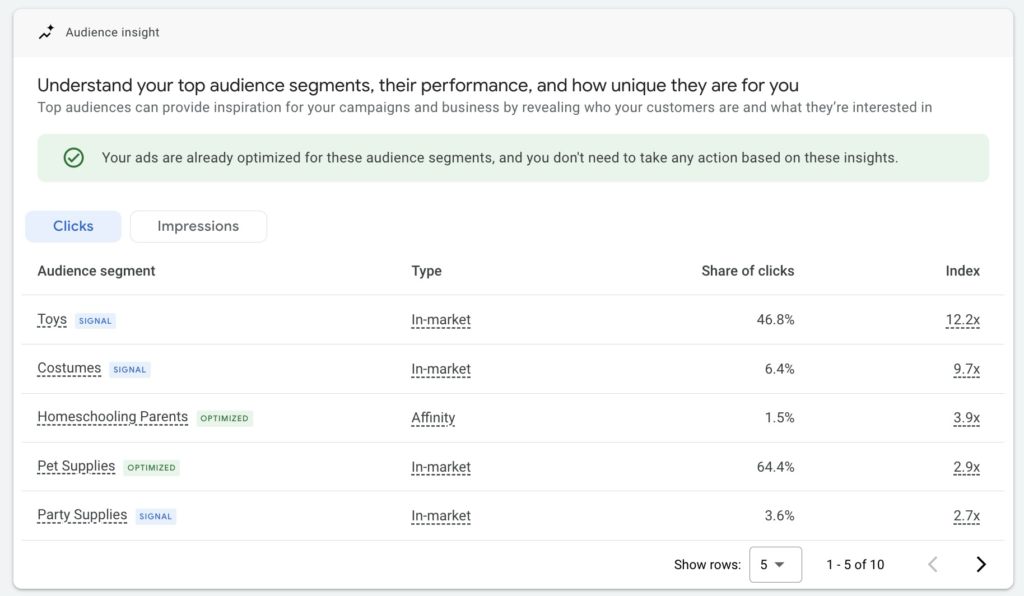
In this evaluation, look for audience segments that work well but haven’t yet been added to the campaign as a signal. You can tell by the marking next to the audience:
- Signal (Blue): This audience is already used as a signal.
- Optimized (Green): This audience was identified by the algorithm and works well.
For the latter, you’ll often find audiences that aren’t directly related to your offer or that you didn’t think of. That’s the strength of PMax.
If you find new audiences in your evaluation that work particularly well, add them to the campaign as an audience signal. This increases the chance that the algorithm will focus even more on high-performing audiences.
In the example above, I would add the „Homeschooling Parents” audience to the audience signals.
Demographic depth in audience reporting
If you want to learn more about how to optimize your Performance Max campaigns: Optimizing PMax Campaigns: 16 Tips for Maximum Performance
More on systematic analysis in the article Analyze PMax Campaigns.
Audience Signals conclusion
In conclusion, audience signals for Performance Max campaigns are very helpful for giving the Google algorithm the right impulses at the start of the campaign.
Audience signals are not an all-powerful tool that can extremely influence campaign performance. It’s also hard to track the effect directly.
To increase the probability that your campaign succeeds, I would still recommend storing suitable signals for each of your asset groups. Just follow the tips from this post.
I hope I could help you and wish you success with your campaigns.
Work smart with Clicks in Mind
You might also like
 Performance Max
 Negative Keywords for PMax: How to Use Them Right
Add negative keywords directly to PMax, up to 10,000 per campaign. How to use the feature optimally for Search and Shopping ads.
Read more → Performance Max
 Analyze PMax Asset Performance: How to Do It in Google Ads
Here you learn where to find PMax asset evaluation, how to use Asset-Group-level Search Terms, and how to pull hard performance data with the Asset Auditor.
Read more → Performance Max
 Analyze PMax Campaigns: How to Do It (+ Hidden Reports)
Learn all the ways to evaluate your Performance Max campaigns, including Channel Performance Report, Asset-Group-level Search Terms, and demographic audience reporting.
Read more →You want more results with Google Ads?
Get a free Google Ads Reality Check: a compact video (about 10 minutes) showing where budget is slipping away in your account and what to change.
Get your Google Ads Reality Check