
Contents What does successful scaling mean?
One of the biggest challenges in performance marketing is successfully scaling your campaigns. The question: can you increase the budget so that performance stays strong and your campaigns remain profitable?
That’s already hard enough. But how does it actually work with Performance Max (PMax) campaigns in Google Ads?
You’ll find the answer in this post. I’ll show you how to scale this fully automated campaign type properly and exceed your sales targets.
In short: To scale a Performance Max campaign, first wait for the initial learning phase. When performance is consistent, increase the budget by 15-20 percent and repeat this process after at least one week.
That was the quick answer. There are many more details to scaling that you should know:
What does successful scaling mean?
To start, I want to discuss the goal of campaign scaling and its consequences. It’s important to have the right expectations.
When scaling a campaign, the goal is to increase reach so that you generate more conversions while campaign performance stays in the target range.
Concretely, that means increasing the budget and thus impressions and clicks, and generating more conversions at an acceptable ROAS (Return on Ad Spend) or CPA (Cost per Result).
This is because PMax campaigns initially focus on ready-to-buy audiences. With more budget available, they increasingly address „cold” audiences. These don’t convert as quickly and need more contact points with your offer, leading to higher costs.
If you decide to scale your campaign, you should therefore expect it to become less efficient. That’s normal.
During the scaling process, performance can also temporarily worsen. Don’t prematurely pause your campaign and reverse the changes. The Google algorithm needs time to adjust to new budgets.
After some time, performance should settle into the desired range. If not, you can decide whether to reduce the budget again.
Scaling has its limits
No matter what scale you’re operating at, there’s always a limit when scaling, beyond which more money doesn’t lead to more results. Sometimes you may spend more money and your performance still declines.
Another goal of scaling is therefore to reach the level where you achieve the best possible number of conversions while still hitting your CPA or ROAS targets.
More tips on how to achieve that in this post: Optimizing Performance Max Campaigns
Let’s now look at how to scale PMax campaigns.
Before scaling: Build an asset stock
Before scaling, check your asset inventory. Google needs enough material to generate ad combinations for broader audiences. Proven minimum equipment per asset group:
- 15 Headlines
- 10 Descriptions
- 20 Images (Landscape and Square)
- 5 Logos
- 5 Videos
If you’re below these values, it’s worth building up assets before ramping up the budget. Otherwise, with broader delivery, Google simply has too little material for relevant ad combinations.
More on asset evaluation in the article PMax Asset Performance Analysis.
Scaling PMax campaigns, step-by-step guide
When scaling PMax campaigns, there’s a process that has proven to work well. It’s also about not making too big changes at once, otherwise the PMax algorithm starts a new learning phase.
More info on the learning phase in this post: Performance Max Learning Phase
With small changes, you can also better control whether performance is developing in the right direction.
1. Wait for the learning phase
For the AI-based PMax campaign, the learning phase is essential. During this time, the algorithm intensively tests which ads, audiences, and placements work best, to later extract the full potential from your budget.
The duration of this learning phase strongly depends on conversion volume. The more success signals (conversions) you submit to Google, the faster the algorithm learns. As a rule of thumb: at least 20 conversions per month, ideally 50+ conversions per month for PMax to work stably.
In some cases, the learning phase can last up to 6 weeks, especially with few conversions. During this time, you should avoid major changes (e.g., Target ROAS, budget, or bidding strategy). Otherwise, the learning process starts over.
It’s therefore important to set up your campaigns properly from the start and structure asset groups sensibly.
2. Increase campaign budget with consistently good results
Before increasing your budget, make sure the PMax campaign delivers consistent and acceptable results over at least 2 weeks.
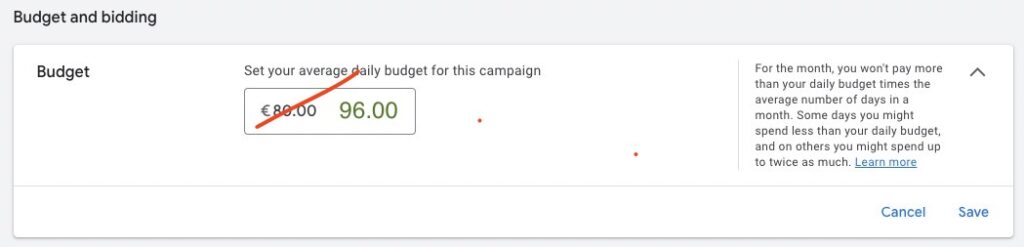
3. Monitor development and increase budget further if needed
After increasing the budget, it’s important to monitor the performance development. If the campaign continues to perform consistently and at most 20 percent below your targets, you can increase the budget by another 15-20 percent.
How long to monitor your changes depends somewhat on the budget level. More budget naturally leads to more data and thus a faster learning effect for Google’s AI. So with higher daily budgets, you can increase the budget after a shorter time.
As a rule of thumb:
- Up to 50 dollars per day: Observation period of 2-3 weeks before increasing again.
- From 100 dollars per day: 1-2 weeks.
- From 500 dollars per day: You can often increase even sooner. I would still recommend waiting at least a week.
4. Monitor channel distribution during scaling
At each scaling step: Check in the Channel Performance Report (PMax campaign → Insights → Channel Performance) whether the channel distribution shifts significantly. If, for example, suddenly 60 percent flows into Display, that’s a warning sign of pure reach scaling instead of conversion scaling.
More on systematic analysis in the article Analyze PMax Campaigns.
5. Scale until your goal or the limit is reached
Repeat the above process until one of the following two events occurs:
- You’ve reached your conversion goal: You now achieve the desired number of conversions and performance is still in the target range. From this point, don’t increase the budget anymore. Instead, try to achieve the same goal with less budget.
- More budget doesn’t lead to more conversions: As mentioned before, you eventually reach a limit where additional costs aren’t worth it. If you observe this over a longer period, don’t continue scaling, but reduce the budget slightly.
Alternative: Lower ROAS target deliberately, for more profit instead of just efficiency
Many people steer their PMax campaigns exclusively via Target ROAS (tROAS). They choose a high daily budget so Google isn’t limited by the budget. As long as the desired ROAS is reached, the campaign can spend as much as possible.
But there’s often a thinking error here: if your goal is profit maximization, a high ROAS alone doesn’t help you. What matters in the end is the actual return after ad costs.
That may seem counterintuitive: A lower ROAS can mean more profit in the end, when you reach more potential customers overall.
If you strategically lower your Target ROAS, Google can use more room to generate additional conversions, even if each is slightly more expensive.
Example calculation (profit margin: 50 percent)
| Approach | Target ROAS | Ad Spend | Revenue | Product Cost (50%) | Net Profit |
|---|---|---|---|---|---|
| A: High-ROAS | 500% | $1,000 | $5,000 | $2,500 | $1,500 |
| B: Profit Maximization | 300% | $4,000 | $12,000 | $6,000 | $2,000 (highest profit) |
| C: Revenue Focus | 250% | $6,000 | $15,000 | $7,500 | $1,500 |
| D: Break-even | 200% | $8,000 | $16,000 | $8,000 | $0 |
In this example, the break-even ROAS is 200 percent. The highest profit is achieved at a Target ROAS of only 300 percent, a value significantly below the often-targeted 500-percent mark.
Scale specifically through new customers (NCA)
If you want to drive growth primarily through new customers, PMax has a dedicated setting called New Customer Acquisition (NCA). You can either set higher bids for new customers (value-based with a markup) or direct PMax exclusively at new customers.
Useful especially when:
- You have a high repeat-purchase rate and returning customers come through organic channels anyway
- You’re entering a new market phase and want to expand the buyer base
- Your Customer Lifetime Value justifies the higher acquisition CPA
Prerequisite: You need clean New-vs-Returning tracking in the conversion setup. Without it, the setting isn’t meaningful.
You want more results with Google Ads?
Get a free Google Ads Reality Check: a compact video (about 10 minutes) showing where budget is slipping away in your account and what to change.
Get your Google Ads Reality Check →
5 tips for successful scaling
For successful scaling of your account, often more is needed than gradually increasing the budget of your PMax campaigns. I want to show you 5 valuable tips.
These go somewhat beyond the framework of individual PMax campaigns. In the end, only the results count, not how we achieve them.
1. Complementary campaigns parallel to Performance Max
In many cases, it makes sense to split your budget across different campaign types. Especially when using Performance Max, a campaign type that gives you more control can be a valuable supplement.
You should always remember that PMax campaigns cover the entire Google network and thus compete with complementary campaigns. Set up correctly, this has no negative effects.
The following campaign types are suitable and have proven themselves:
-
Dynamic Search Ads (DSA): This campaign type is especially suitable for e-commerce. For more control over the search results of your products and categories, it’s recommended to create a complementary dynamic search campaign for each PMax campaign. It’s important to view both campaigns as a unit. DSA performance can be inconsistent because Google fluctuates between PMax and DSA on search traffic. These fluctuations are normal and not a problem.
-
Best-Performer Search Campaigns: Another good supplement is a search campaign that contains only the best keywords or search terms from your PMax campaign. Enter the keywords as Broad Match and use the automated bidding strategy Maximize Conversions with a Target CPA. Set this Target CPA about 20 percent above your actual goal to avoid restricting your campaign too much.
-
YouTube Ads: YouTube is a very good channel for reaching new, „cold” audiences. Especially when you have big scaling goals, finding new potential customers is important. If you have good videos, YouTube Ads are a great supplement. They don’t function as a pure conversion machine. When creating the campaign, use the best keywords and audiences from PMax campaigns.
2. Analyze and optimize your website
In PMax campaigns, you can specify a destination URL for each Asset Group, but Google can decide by default which landing page users land on. If you don’t deactivate it, Google uses URL expansion.
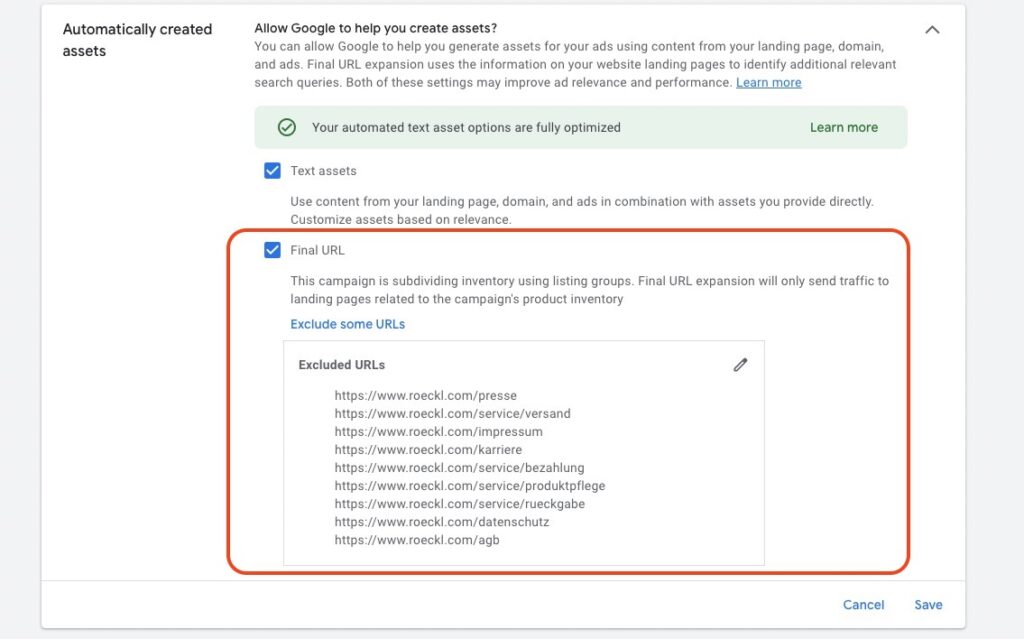
This means that Google scans your entire website and decides based on the content of individual pages where a user is sent after clicking an ad.
If you additionally use auto-generated text assets from Google (also enabled by default), ad copy is created based on your website texts.
For successful PMax campaigns, a high-quality website with good content is therefore extremely important, especially when scaling.
So check and optimize your website before increasing your budget.
3. Use other channels for retargeting
Scaling your campaigns leads to growing website traffic. At a certain point, these include „cold” audiences that may have their first touchpoint with your brand.
To successfully scale, it’s extremely important to pick up these people and gradually bring them to conversion through repeated contact.
You can use Google Remarketing for that, and PMax campaigns also use Remarketing automatically. But you should look beyond the Google universe and address your website visitors on other channels too.
Possible channels:
- Email marketing
- Meta Retargeting
- LinkedIn Retargeting
Scaling should be thought of holistically. Don’t forget the potential of other channels.
The last two tips relate again more to the specific PMax campaign you want to scale.
4. Control your brand traffic
This tip is especially useful if you represent a strong brand with significant search volume.
PMax campaigns use every opportunity to generate conversions. This often results in search queries containing your brand name (brand traffic) making up a large portion of campaign traffic.
But: Not in all cases is that a good thing. Because if someone is already searching for your brand name, the person would probably land on your website and convert without paid ads.
When you scale your PMax campaigns, it can happen that Google bids even more aggressively on your own brand name without you really benefiting.
For this reason, it’s important to regularly check the search terms of your campaigns and exclude your brand name if necessary. You can then bid more controlled on your brand traffic in a separate Search or Shopping campaign.
5. Check your products
For e-commerce PMax campaigns, it’s important to regularly check your product performance when scaling.
After the learning phase, the Google algorithm often focuses on a few products that sell well. With increased budget, it can happen that costs for worse-performing products rise.
This influences overall campaign results.
For this reason, you should regularly check the Listing Groups and product evaluation. Pay attention to high costs for products or product groups that lead to below-average results. Exclude these from your campaign.
Conclusion: Scaling PMax campaigns properly
I hope I could help you with this post. You should take away the following points:
- Increase budget by no more than 15-20 percent and give the algorithm time.
- View scaling as an investment and don’t expect the same cost per conversion right away.
- Less strict target values for ROAS or CPA can ease scaling and ultimately bring better business results.
- For new-customer focus, activate the NCA setting instead of just turning the budget screw.
- Consider scaling holistically and use other campaign types and channels to support your efforts.
Thank you for reading this article. I wish you successful growth of your campaigns.
Work smart with Clicks in Mind
You might also like
 Performance Max
 Negative Keywords for PMax: How to Use Them Right
Add negative keywords directly to PMax, up to 10,000 per campaign. How to use the feature optimally for Search and Shopping ads.
Read more → Performance Max
 Analyze PMax Asset Performance: How to Do It in Google Ads
Here you learn where to find PMax asset evaluation, how to use Asset-Group-level Search Terms, and how to pull hard performance data with the Asset Auditor.
Read more → Performance Max
 Analyze PMax Campaigns: How to Do It (+ Hidden Reports)
Learn all the ways to evaluate your Performance Max campaigns, including Channel Performance Report, Asset-Group-level Search Terms, and demographic audience reporting.
Read more →You want more results with Google Ads?
Get a free Google Ads Reality Check: a compact video (about 10 minutes) showing where budget is slipping away in your account and what to change.
Get your Google Ads Reality Check