Contents Why are well-defined keyword groups useful?
Keyword grouping in Google Ads has a huge impact on the success or failure of a campaign. After several major updates (match type consolidation 2021/2023, AI Max auto-upgrade from September 2026), keyword grouping in 2026 works fundamentally differently than two years ago.
In this post, you’ll learn what has changed and how to group your keywords in the new Google Ads environment.
Quick answer: Google interprets the meaning of keywords. Spelling doesn’t matter. For every clearly distinct search intent, you create one keyword group with 3-10 thematically related keywords. More ad groups in 2026 beat overloaded ad groups.
Step-by-step approach:
- Collect keywords
- Identify core terms and modifiers
- Group core terms and modifiers into Keyword Themes
- Group keywords by Keyword Theme
Why are well-defined keyword groups useful?
Good and thoughtful keyword grouping gives you multiple benefits:
-
More relevant ads: With clear keyword groups, you can create ads that match the specific query. If a user searches for “red leather jacket”, your ad shouldn’t show generic “jackets” but lead directly to a selection of red leather jackets.
-
Better Quality Score and lower CPC: Google’s entire business model depends on users finding what they search for. Ad relevance, together with expected CTR and landing page experience, determines the Quality Score of your ad. Ads with high quality are rewarded with a lower CPC.
-
Easier optimization: Optimization is mainly about avoiding waste. With well-segmented groups, you can easily tell which queries bring in money and which you’d rather stop targeting.
What criteria should you use?
The goal is to group keywords by search intent. Ask yourself: “What does the user really want when they type these words into Google?”
For every distinct user intent, you create one ad group. This is often called a Keyword Theme.
What is a Keyword Theme?
A Keyword Theme is a group of related search queries with a shared search intent. Sticking with the fashion store example: You sell leather jackets, denim jackets, and winter jackets. Each differs by color, size, price, target group.
Plus, there are modifiers that signal search intent (“price”, “buy”, “cheap”, “best”).
A Keyword Theme could look like:
- Buy a jacket
- Red Leather Jacket Women
- Best Winter Jacket Men
Many combinations, each with a different intent.
What changes in 2026
The match-type consolidation of recent years and the announced AI Max auto-upgrade from September 2026 visibly change practice. Three points matter for keyword grouping:
1. Fewer keywords per group, more groups: Instead of 15-30 keywords in one ad group, advanced accounts work with 3-10 focused keywords. Better to create another ad group if a theme is really different.
2. Broad Match + Smart Bidding becomes the default: 62 percent of advertisers using Smart Bidding run Broad Match as their primary match type. Auction-time bidding compensates for the breadth with selection precision in each auction.
3. AI Max from September 2026: Search campaigns with campaign-level Broad Match get auto-upgraded to AI Max. AI Max additionally uses landing page content, account assets, and URLs as targeting signals. Classical keyword lists lose more weight as a control mechanism, but cleanly grouped thematic ad groups remain the most important architecture decision.
Step-by-step guide
Let’s go through how to collect, group, and optimize keywords for Google Search campaigns from start to finish.
1. Collect keywords
You need a keyword base before grouping. A very helpful free tool is the Google Keyword Planner.
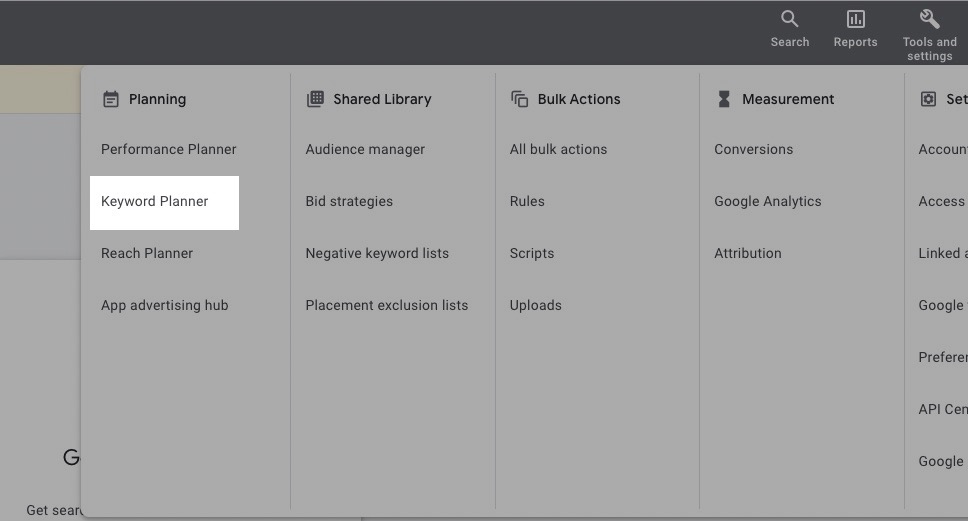
You can reach it via the Google Ads UI under Tools and Settings > Planning > Keyword Planner.
In the Keyword Planner, you can either let Google scan your landing page and pull terms automatically, or enter your seed terms manually. You usually get better results entering terms manually.
For the jackets example, you might enter the core terms:
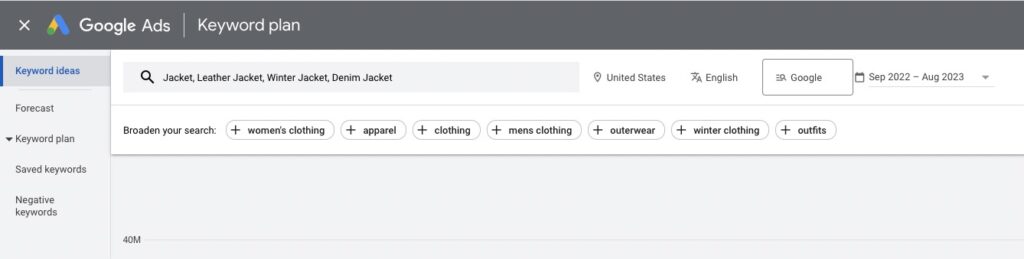
Google then gives you a long list of related queries you can add to your list. Helpful: the additional info (search volume, competition, CPC).
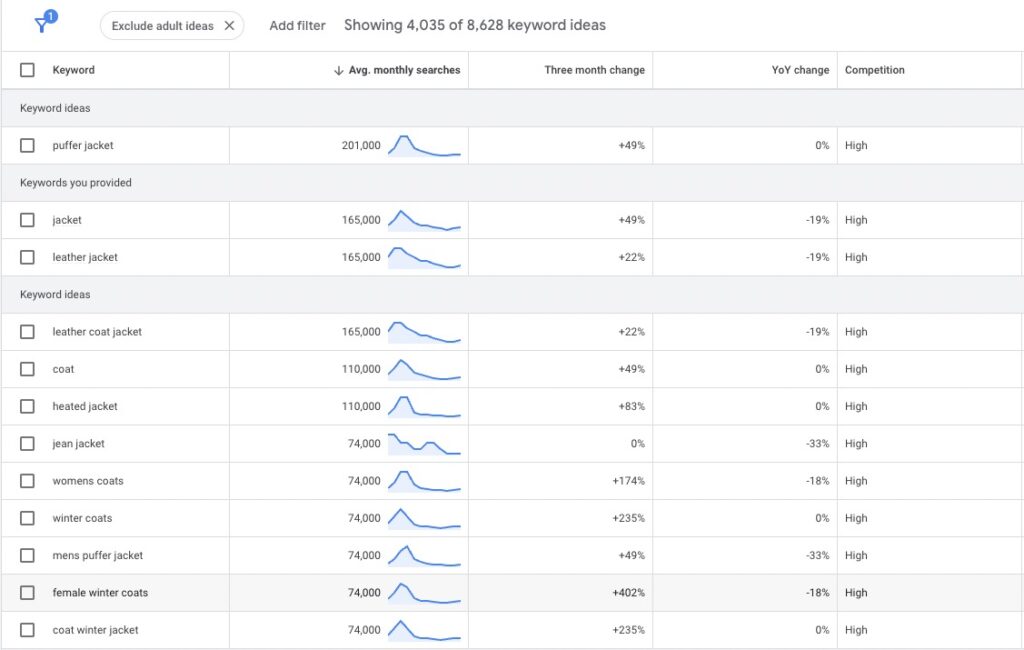
Walk through the list and pick keywords that match your campaign and the products you advertise. Tempting as the search volume looks, avoid too-generic keywords (example: “coat”).
Once you’ve selected all relevant keywords, you can add them to a plan and export as CSV or Google Sheet.
What counts here: quality over quantity. Due to the Google Ads changes, you don’t need as many keywords per ad group as before. 3-10 clean keywords per theme is the 2026 rule of thumb.
2. Identify core terms and modifiers
Next, bring order to your keyword list. Look for core terms and modifiers that change search intent.
Best practice: separate core terms and modifiers into different columns. Then you can build the grouping in the next step.
In our case, the core terms are the product types:
- Leather Jacket
- Denim Jacket
- Winter Jacket
Possible modifiers could be color, size, or target group (men, women, kids).
Important: keep only highly relevant modifiers.
Other modifiers: intent signals
In SEM, there are well-known modifiers that signal search intent. Here’s a common classification:
-
Transactional / Commercial: User wants to perform an action like buying.
- buy, order
- discount, cheap, price
- download
- rent, lease
- best
-
Informational: User wants to find information, often before a purchase decision.
- comparison
- review, experience
- test
- guide
- how
-
Navigational: User wants to find something, digital (website, app) or physical (places, stores).
- where
- address
It’s always worth examining your keyword list for search intent and looking for such signal words.
You want more results with Google Ads?
Get a free Google Ads Reality Check: a compact video (about 10 minutes) showing where budget is slipping away in your account and what to change.
Get your Google Ads Reality Check →
3. Group core terms and modifiers into Keyword Themes
With your keyword list organized, you can now define your Keyword Themes. Each core term alone (e.g. “Leather Jacket”) and combined with a modifier (e.g. “Red Leather Jacket”) forms a Keyword Theme.
Don’t include every combination, only those that make sense for your campaign. Especially with limited budget, focus on the broad distinctions.
A distinction between “Leather Jackets Men” and “Leather Jackets Women” is usually more important than a color distinction.
4. Group keywords by Keyword Theme
Now group your keywords. With your Keyword Themes ready, you just need to sort the keywords from your list by Keyword Theme. Done.
Each keyword group can now become an ad group in a Google Search campaign. To leverage the thoughtful grouping, create matching ads and link to the most relevant landing page.
After grouping, you decide whether to put all keyword groups into the same campaign or create multiple campaigns. This could be the case if you have specific budgets or want to use different bidding strategies.
Once the campaign(s) is running, regularly review your grouping. Use the search terms report for this.
A 2026 note to close: If you’ve added multiple match-type variants of the same keyword, Google has been checking these as “Redundant Keywords” since January 2023 and consolidating into Broad Match. More in Remove redundant keywords.
I hope this post was helpful. Good luck grouping your keywords.
Work smart with Clicks in Mind
You might also like
 Search
 How many Ad Groups per Google Ads Campaign in 2026?
Ideal ad-group count per Search campaign in 2026: 3-10 thematic clusters. AI Max context + structuring guide.
Read more → Search
 How many Google Ads per Ad Group in 2026?
How many RSAs per ad group in 2026? 1-2 are enough, large ad groups can use up to 3. AI Max context + A/B test setup step by step.
Read more → Search
 What are Broad Match Keywords in Google Ads? (2026 Guide)
Broad Match in 2026: bridge to AI Max from September 2026 + default combo with Smart Bidding. Mechanics, use cases, and risks explained.
Read more →You want more results with Google Ads?
Get a free Google Ads Reality Check: a compact video (about 10 minutes) showing where budget is slipping away in your account and what to change.
Get your Google Ads Reality Check