Contents Your key takeaways
If you regularly check the recommendations Google suggests for your search campaigns, you will see the following on a regular basis:
Remove Redundant Keywords
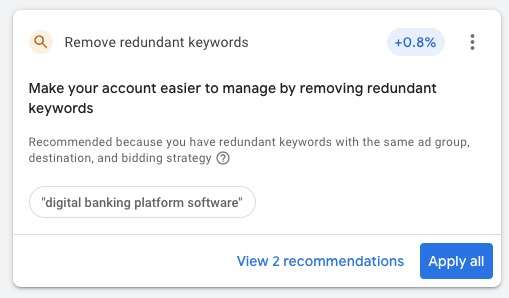
In this short post, I want to explain to you what redundant keywords are all about, why Google makes this recommendation, and how you should deal with it.
Your key takeaways
-
What are redundant keywords? Google classifies keywords as redundant if multiple keywords in an ad group can trigger ads for the same search queries. Since January 2023, this applies across match types: a phrase match keyword can be flagged as redundant against a thematically similar broad match keyword, even if the wording is not identical.
-
What happens if you accept the recommendation? Google consolidates phrase and exact match keywords in favor of broad match. As a result, you gradually build up the broad match share in your account, even if that was never your original strategy.
-
My recommendation: Do not apply this recommendation automatically. Check it manually and only accept it where the performance difference is clearly proven.
Want more detail? The mechanics, the effects on your account, and the concrete recommendation are in the next sections.
What are redundant keywords in Google Ads?
Before we get into the recommendation to remove redundant keywords, it’s important to understand what redundant keywords are in the first place:
Google defines them this way:
Redundant keywords are equivalent to higher-performing keywords or keywords in broader match types. Removing these redundant keywords and consolidating your keywords across match types will help you manage your account more easily. It doesn’t negatively impact your performance, and still allows your ads to appear on the same searches.
Definition from Google Ads
What does this mean in simple language?
Google categorizes a keyword as redundant in one of two situations:
Situation 1: Identical wording, different match types
You have [men's shoes] (Exact Match) and men's shoes (Broad Match) in one ad group. Both mean the same thing. Google flags the Exact Match keyword as redundant because the Broad Match keyword can cover the same search queries anyway.
Situation 2: Different wording, thematically similar (since January 2023)
You have "women's hats" (Phrase Match) and ladies hats (Broad Match) in one ad group. The wording is not identical, but the meaning is. Google flags the Phrase Match keyword as redundant because, according to Google, the broader keyword already covers the same search queries.
This cross-match-type mechanic has been in place since January 19, 2023. Before that, Google only consolidated within the same match type. The mechanic has been stable since.
What this means in practice: Phrase and exact match keywords are consolidated step by step in favor of broad match. If you accept the recommendation blindly, you gradually build up the broad match share in your account, even if you never intended to.
Why should you avoid redundant keywords?
When different keywords target the same search queries, they compete with each other.
This means that redundant keywords can lead to inefficient use of your advertising budget and affect the quality of your campaigns.
In addition, redundant keywords make it harder for you to analyze and optimize your campaigns. Performance data for similar search queries is split across different keywords. This leads to messy reports.
By the way: also check out this article if you want to know more about Google Ads recommendations.
How does the Google Ads recommendation „Remove redundant keywords” work?
If you have keywords in your campaigns that Google considers redundant, Google will recommend you to remove these keywords at regular intervals.
As with all recommendations, Google gives you 4 options on how to handle the recommendation:
Automatically apply recommendations
With this option, Google will automatically remove redundant keywords if any are found.
To set this, navigate to Recommendations > Auto-apply in Google Ads.
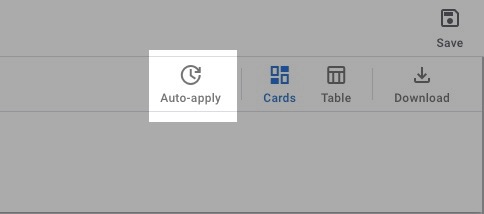
Then, in the „Maintain your ads” group, find the keywords and targeting options. Check the box „Remove redundant keywords”.
Note: You can also manage this setting in the Google Ads Editor under „Recommendations” if you prefer to work there.
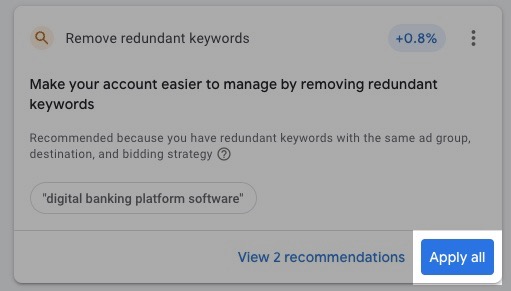
Apply all
In the recommendation overview, click „Apply all”. All found redundant keywords will be removed.
Check recommendations manually
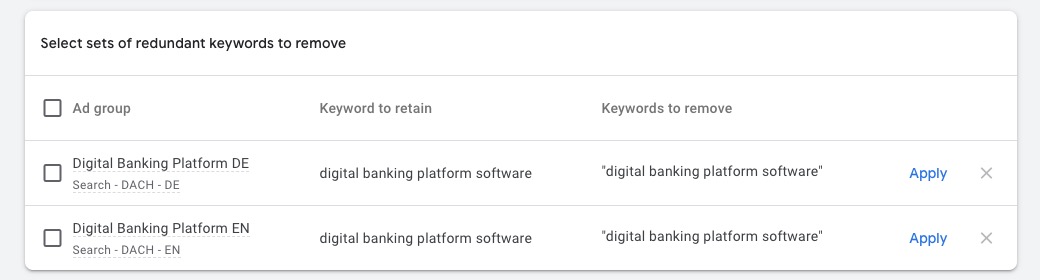
Click „Show all” to review Google’s suggestions individually and accept or dismiss them.
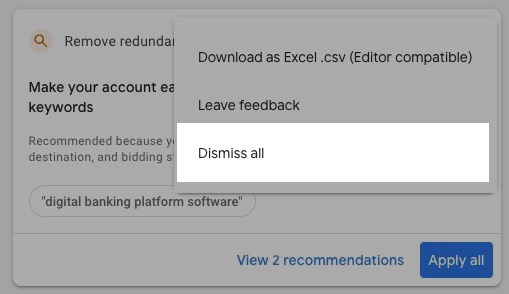
Dismiss all
In the overview or in the individual view, you can also reject the recommendations all at once.
You want more results with Google Ads?
Get a free Google Ads Reality Check: a compact video (about 10 minutes) showing where budget is slipping away in your account and what to change.
Get your Google Ads Reality Check →
What effects does the recommendation have on the Google Ads account?
If you accept the recommendation and remove redundant keywords, this will have some effects on your entire account:
-
Your account will become more organized. Google itself puts this as the main reason for the recommendation. If you have different keywords targeting the same search queries, it is better to consolidate them and combine the data. This way you can make better decisions.
-
Your account will tend to use broad match more. Google prefers broad match keywords. This is also reflected in the recommendations. If you accept all recommendations, you will gradually use more and more broad match keywords. But this does not always have to be the best for your performance.
To understand the implications, it helps to understand broad match: How does Broad Match work?
In short, this can lead to lower click-through rates, lower ad relevance, and higher cost per conversion.
-
Better optimization score. The optimization score is not as critical as Google likes to make it. Still, you should make sure it stays above 90 percent across all accounts. This way you avoid auction disadvantages and you always get the latest Google Ads features.
The good thing: Your optimization score increases when you accept OR dismiss recommendations. Google just wants to see that you have considered them.
Should redundant keywords be removed automatically?
As described earlier, there is an option in Google Ads to automatically apply recommendations without having to do anything yourself. Sounds too good to be true. And it is.
My clear recommendation: always check redundant keywords manually and don’t remove them automatically.
The recommendation will not always work in your favor. Your keywords are the key to profitable campaigns, and you should treat them that way. That doesn’t mean that Google recommendations can’t help you.
Take a look at the recommendations in detail, compare the performance of the keywords yourself, and then decide whether to apply them.
FAQ: Frequently asked questions about redundant keywords
What happens if I accept the recommendation blindly?
You gradually build up more broad match in your account because phrase and exact match keywords get consolidated in favor of broad match. That can lead to more spillover, lower click-through rates, and higher CPAs. So check manually and only accept where the performance difference is clear.
Does the recommendation apply across ad groups?
No. Redundant keywords must be in the same ad group, have the same landing page, and use the same bidding strategy. Across multiple ad groups, the recommendation does not apply.
What about keyword insertion in ads?
Ad groups that use keyword insertion in ad text are excluded from the recommendation. Google recognizes that keyword variations have a different function there than pure search triggers.
I hope I could help you with this post. Good luck with your campaigns!
Work smart, not hard - Clicks in Mind
You might also like
 Search
 How many Ad Groups per Google Ads Campaign in 2026?
Ideal ad-group count per Search campaign in 2026: 3-10 thematic clusters. AI Max context + structuring guide.
Read more → Search
 How many Google Ads per Ad Group in 2026?
How many RSAs per ad group in 2026? 1-2 are enough, large ad groups can use up to 3. AI Max context + A/B test setup step by step.
Read more → Search
 What are Broad Match Keywords in Google Ads? (2026 Guide)
Broad Match in 2026: bridge to AI Max from September 2026 + default combo with Smart Bidding. Mechanics, use cases, and risks explained.
Read more →You want more results with Google Ads?
Get a free Google Ads Reality Check: a compact video (about 10 minutes) showing where budget is slipping away in your account and what to change.
Get your Google Ads Reality Check