Contents What are solutions in Google Ads?
You may have noticed: There’s a dedicated option for bulk actions in Google Ads: Solutions.
In this post, you’ll learn everything you need to know about it.
In a nutshell: Solutions in Google Ads are automated script templates that make tasks like creating reports, checking links and adjusting budgets easier. They improve efficiency and provide an easy way to perform bulk actions without any coding knowledge.
What are solutions in Google Ads?
Solutions in Google Ads are automated script templates that help you perform various tasks in your account more efficiently.
They are part of the bulk action menu item and allow you to create workflows that run automatically.
This includes tasks such as checking links, adjusting budgets, creating reports and alerts.
Solutions are just one of several tools that run under the radar inside your account. You can find more of them in my overview of the hidden Google Ads features.
Solutions vs scripts: What’s the difference?
There is no difference in function between solutions and scripts. Both are used to carry out bulk actions in the entire account.
Solutions are simply premade templates for popular scripts that can be used without any knowledge of code. There are currently 6 of these templates.
If you want to write your own code or use ready-made scripts for more complex tasks, take a look at my post on PMax scripts.
What advantages do solutions offer?
-
Keeping track of your account:
With solutions, you can automatically generate reports and set up alerts that inform you about important changes and performance in your account. This means you always have an overview and can react quickly to anomalies. -
Efficiency:
Solutions offer an easy way to carry out bulk actions. Whether you need to adjust several campaign budgets at the same time or create comprehensive reports, solutions save you time and significantly reduce manual effort. -
Scripts without code knowledge:
A big advantage of solutions is that you don’t need any programming knowledge to use them. The scripts are pre-built and easy to customize, so you can take advantage of automations without having to write code yourself.
What solutions are available in Google Ads?
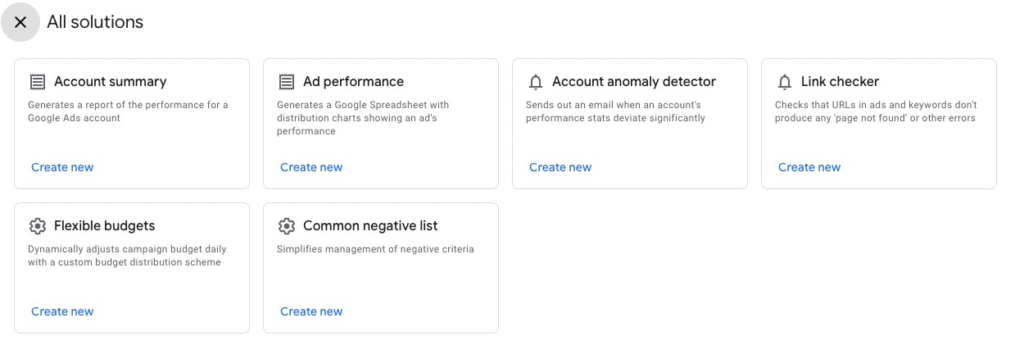
Google Ads currently offers 6 different solution scripts to help you manage and optimize your campaigns more efficiently:
-
Account summary: This solution creates a comprehensive performance report for your Google Ads account, giving you a quick overview of all important metrics and their development.
-
Ad performance: This solution creates a Google spreadsheet that contains distribution charts for the performance of your ads.
-
Account anomaly detector: This solution sends an email notification when your account performance statistics deviate greatly from normal values. As ongoing monitoring, it pairs well with the automated Google Ads recommendations, which you should not adopt blindly, though.
-
Link checker: This solution checks the URLs in your ads and keywords to ensure that no errors such as 404 are returned.
This helps you to ensure that all links in your ads are working and redirecting users to the correct pages. Broken destination URLs are among the most common Google Ads mistakes that quietly waste budget. -
Flexible budgets: This solution dynamically adjusts the campaign budget on a daily basis, based on a custom distribution scheme.
-
Common negative list: This solution simplifies the management of exclusion criteria by creating and managing a centralized list.
You want more results with Google Ads?
Get a free Google Ads Reality Check: a compact video (about 10 minutes) showing where budget is slipping away in your account and what to change.
Get your Google Ads Reality Check →
How do you create a solution in Google Ads?
To create a solution in Google Ads, follow these simple steps:
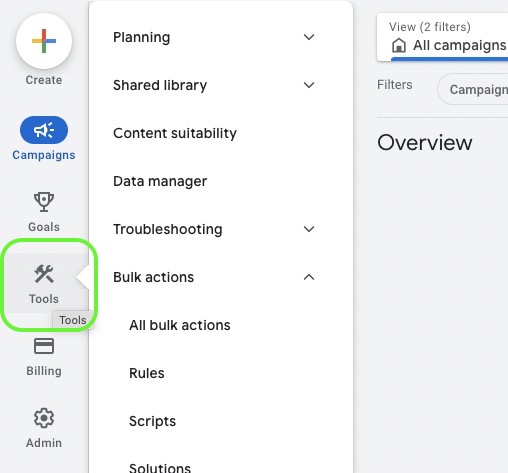
1.Open your Google Ads account:Click on the tools icon
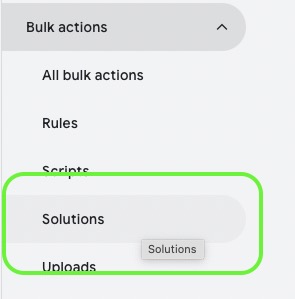
2.Select Bulk actions:Click on “Solutions” in the menu
3.Create new solution:Click on the plus symbol to create a new solution
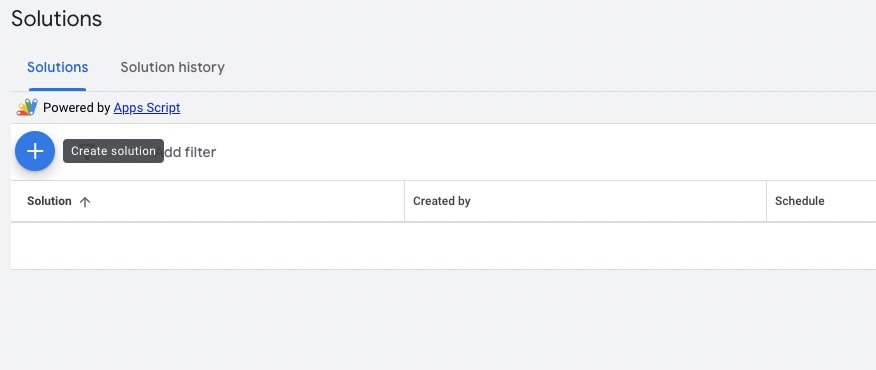
4. Select a solution and make the appropriate adjustments
As an example, let’s take the account anomaly detector.
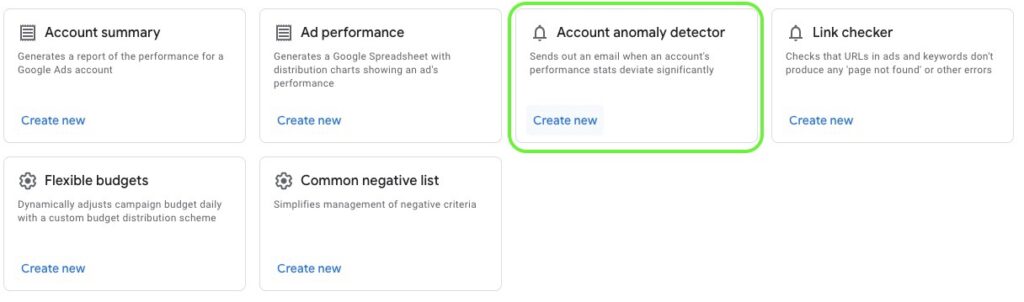
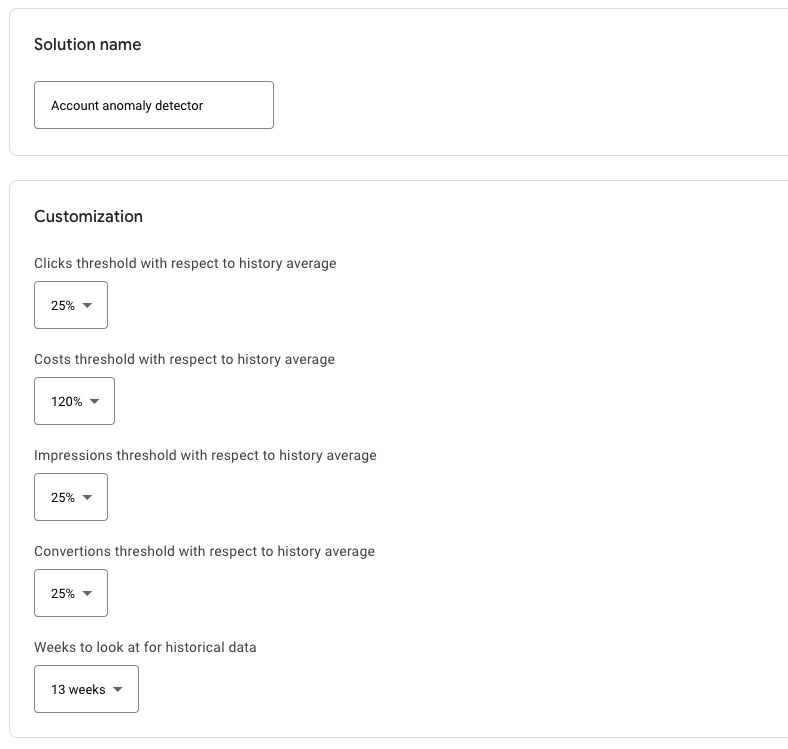
You can choose a separate name for each solution and make the corresponding adjustments. The options available are different for each solution.
For the account anomaly detector, you can specify the deviations from your account average for various metrics such as costs, clicks or conversions.
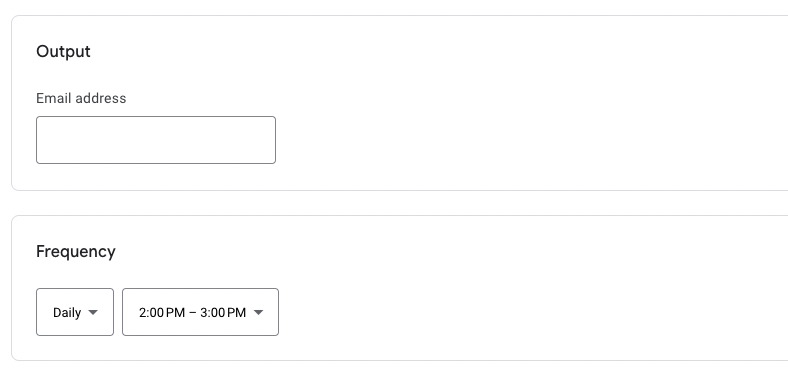
Further down, you will find a field for your email address, to which a corresponding alert will be sent.
With other solutions, you will receive emails with reports or information when the solution has detected an error.
In addition, each solution has a selection field for the frequency. This is where you specify when and how often the underlying script should be executed.
5. Save solution and preview
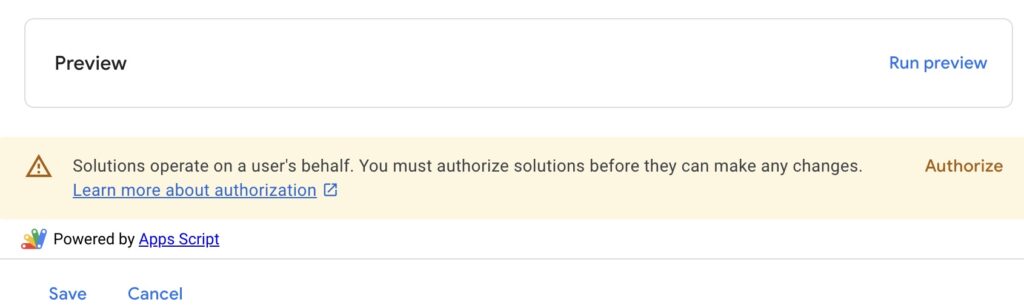
Save the solution and run a preview to make sure that everything works correctly. Note that you must first authorize the execution of the solution.
Conclusion and more to come
The solutions in Google Ads offer you great opportunities to manage and optimize your campaigns more efficiently.
With features such as performance reports, link checks and dynamic budget adjustments, you can automate important tasks and keep track of your campaigns.
The set of solutions has been stable since launch. Whether Google expands it in the future remains open. So focus above all on the templates that take real work off your plate today.
While you are at it, it is worth cleaning up the account where these scripts do their checking. A good starting point is my guide on how to remove redundant keywords.
I hope I was able to help you with this post and wish you an efficient path to success with Google Ads!
Work smart with Clicks in Mind.
You might also like
 Account
 Black Friday & Christmas: The Google Ads Guide
Discount or free gift, separate campaign or not, adjust bids or leave them alone: the options Google Ads gives you for Black Friday and the holiday season, and when each one makes sense.
Read more → Account
 Google Ads for Ecommerce: From Setup to Scaling
How to build out Google Ads for your online store: goals, tracking, product feed, your first campaigns, and the strategies that scale them profitably.
Read more → Account
 Google Ads Account Setup in 2026: A Beginner's Roadmap
Get started with Google Ads: step-by-step guide from account creation to the first campaign - including valuable tips.
Read more →You want more results with Google Ads?
Get a free Google Ads Reality Check: a compact video (about 10 minutes) showing where budget is slipping away in your account and what to change.
Get your Google Ads Reality Check