
Contents What are Google Ads promotional offers and how do they work?
Google regularly hands out Google Ads promotional credits. Most people only think of new-customer offers.
What often gets missed: existing accounts sometimes receive promo codes too, frequently by email. And those emails are easy to overlook because they sit among other notifications. That nearly happened to me recently.
In this article, I’ll show you how Google Ads promotional offers work, how to redeem them and where you can check whether you’re eligible.
The most important things at a glance
-
What are Google Ads promotional offers?
Google Ads credit is an advertising cost voucher that is offset against future advertising costs. No payment possible. -
How do you redeem them?
Either via a signup offer for new accounts or via Billing → Promotions by code. -
How do you check eligibility?
In your account under Promotions and in your Google emails. Offers are not just for new accounts.
What are Google Ads promotional offers and how do they work?
Google usually calls these offers Promotions or promotional offers. Essentially, it is a credit added to your account if you meet certain criteria.
You can find Google’s explanation here.
Typical logic:
- You activate an offer or enter a code
- The code usually has to be added to the account within 14 days of your first ad impression
- You reach the minimum spend in the defined period (often 60 days)
- After that, the credit is automatically applied and offset against future costs
Watch the expiry: The credit you receive also has an expiration date. It often expires 60 days after it is applied if you don’t use it up. This is exactly where many people lose their credit, not when redeeming it, but by forgetting about it afterwards. You can see the exact status under Billing → Promotions. Letting credit expire is, by the way, one of the most common Google Ads mistakes.
A small point of clarification on the math: with “Spend 400, get 400” you pay 400 € yourself, get 400 € credit on top, and advertise with a total of 800 €. So the credit is not “free budget with no spend of your own”, it’s a doubling of your first spend.
Important, because it is often misunderstood:
- Credit is not money that you can withdraw
- Support cannot add promotions on request
- The conditions of the respective offer are always decisive
You want more results with Google Ads?
Get a free Google Ads Reality Check: a compact video (about 10 minutes) showing where budget is slipping away in your account and what to change.
Get your Google Ads Reality Check →
Instructions: How to redeem your credit
1) Signup offer for new accounts
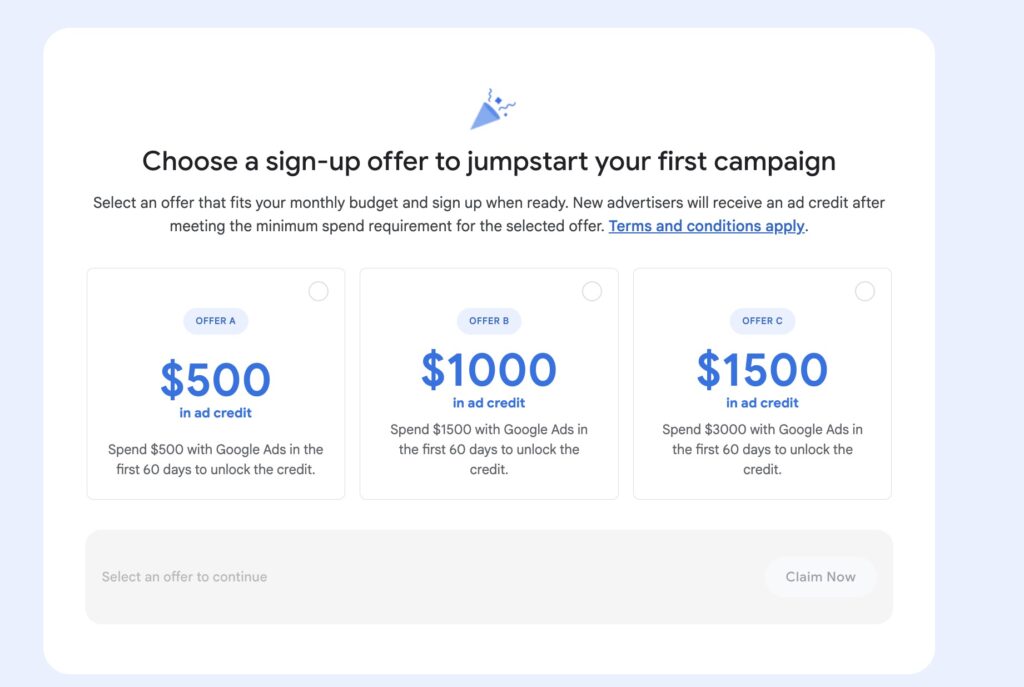
For new accounts, Google often shows an offer such as “Spend X in the first 60 days to unlock Y credit” directly at the start. You choose an option that matches your planned budget.
Typically the offer comes in several tiers, matched to your planned budget. In Germany you currently often see this logic:
- Spend 400 € → 400 € credit
- Spend 1,200 € → 1,200 € credit
- Spend 2,400 € → 2,400 € credit
After that, it usually works like this:
- Select offer
- Set up account and start campaign
- Reach the minimum spend in the period
- The credit will be applied later
Current offers:
If you’re just setting up a new account, here’s my guide to setting it up. This is how to set the account up correctly so you don’t give away the credit:
2) Enter promo code in existing account
If you receive a code by email or via a partner, you can enter it in Google Ads:
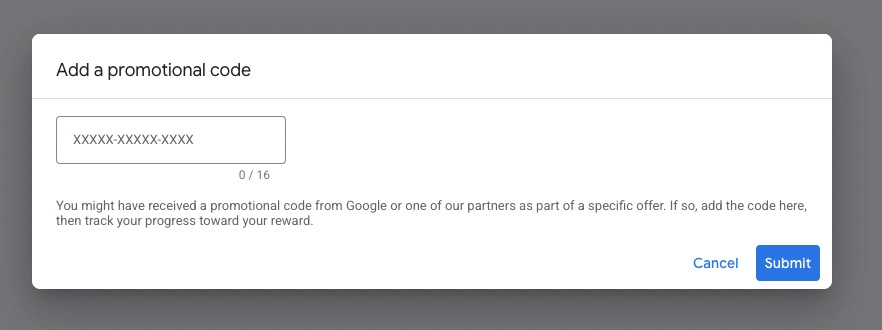
- In Google Ads at the top on Tools & Settings
- Open Billing
- Select Promotions
- Click on the plus sign
- Enter the code and apply it
Then the same applies again: fulfill the conditions, then the credit will be applied automatically.
Check eligibility: Where you need to look
A) In the account under Billing → Promotions
This is the quickest check. If an offer is active or a code can be stored, you will see it there.
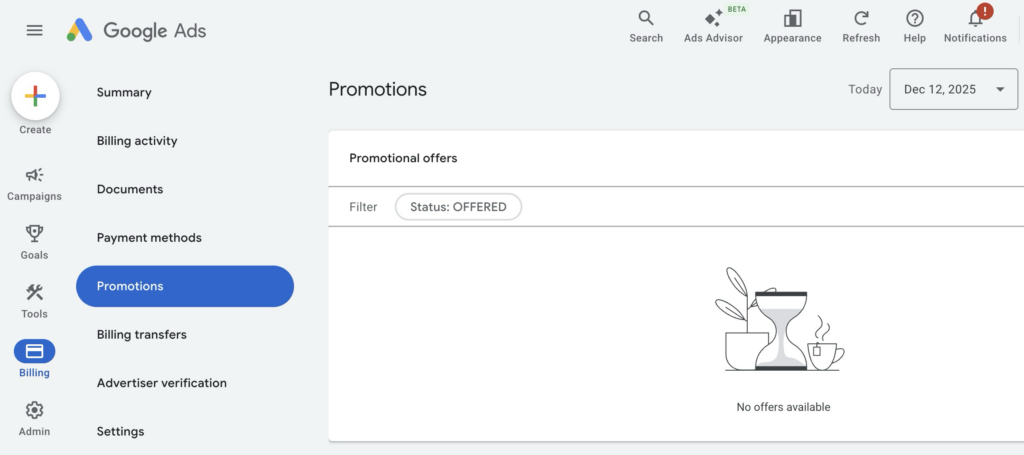
My tip: Don’t just check it once, but make a little routine out of it. Especially if several people have access to the account or the account is not opened daily.
B) In your emails
Many promotions come as marketing emails from Google. These tend to end up in tabs such as “Advertising” or get lost in your inbox.
Search terms for the inbox:
- “advertising credit”
- “Google Ads credit”
- “Promotion”
- “Google Ads code”
C) Advantage if you work with a Google Partner
If you work with a Google Partner, this can be a real advantage.
I am a Google Partner myself. In Manager accounts, there is a separate overview for Promotional offers, and depending on the country and account, offers appear there that I can use for my customers.
Codes don’t always have to come directly from Google, by the way. Sometimes you can get them through hosting providers or partner programs, often with smaller amounts.
FAQ: Frequently asked questions about Google Ads promotional offers
Are the Google Ads promotional offers only available for new customers?
No. There are classic signup offers for new advertisers. But there are also promotions for existing advertisers.
Can I have the credit paid out?
No. It is only offset against advertising costs.
Why don’t I see an offer even though others are receiving one?
Promotions are selective. Not every account automatically receives an offer.
Where can I see the expiration date and status?
Usually under Billing → Promotions.
Conclusion
Google Ads credit is quickly “earned” budget if you fulfill the conditions.
The most important point: Not only new accounts benefit. Existing accounts also sometimes receive codes by email, and it is precisely these that are often overlooked.
If you don’t want to miss out on this topic, do the 2-minute check today:
- Open Google Ads: Billing → Promotions
- Search your mailbox: “promotion” or “advertising credit”
This will save you several hundred euros in case of doubt.
Work smart with Clicks in Mind
You might also like
 Account
 Black Friday & Christmas: The Google Ads Guide
Discount or free gift, separate campaign or not, adjust bids or leave them alone: the options Google Ads gives you for Black Friday and the holiday season, and when each one makes sense.
Read more → Account
 Google Ads for Ecommerce: From Setup to Scaling
How to build out Google Ads for your online store: goals, tracking, product feed, your first campaigns, and the strategies that scale them profitably.
Read more → Account
 Google Ads Account Setup in 2026: A Beginner's Roadmap
Get started with Google Ads: step-by-step guide from account creation to the first campaign - including valuable tips.
Read more →You want more results with Google Ads?
Get a free Google Ads Reality Check: a compact video (about 10 minutes) showing where budget is slipping away in your account and what to change.
Get your Google Ads Reality Check