Contents Why does Google serve your existing customers by default?
- Why does Google serve your existing customers by default?
- When is splitting new and returning customers worth it?
- Step 1: Set up new vs. returning customer tracking
- Step 2: Make the analysis visible in Google Ads
- Step 3: Set up the Customer Match list
- Which features does Google Ads offer for new-customer acquisition?
- What can you do with this distinction?
- FAQ: New-customer tracking in Google Ads
- Conclusion
In a lot of accounts the numbers look solid: the ROAS is fine, revenue is coming in. And still, growth barely moves.
The reason is often that a large share of that revenue comes from buyers who would probably have ordered anyway. New customers barely get added, and the standard reporting doesn’t make it obvious.
That comes down to how Smart Bidding works: it favors the most likely buyer, and that’s almost always your existing customers. If you don’t tell Google who has already bought from you and who is new, it keeps optimizing for the easier goal.
In this post I’ll walk through how to get that distinction into your account: the new_customer signal in the conversion tag, a Customer Match list of your existing customers, and the new-customer features you use to steer budget toward new customers.
The essentials at a glance
- What’s the goal? Give Google the information whether a conversion comes from a new or an existing customer, and point bidding at real new-customer growth.
- What do you need? A new-customer signal from your shop in the conversion tag, a Customer Match list of your existing customers, and the right new-customer feature in the account.
Why does Google serve your existing customers by default?
Smart Bidding has a target, usually a tROAS value, and takes the path of least resistance to hit it.
The cheapest, safest purchase comes from someone who already knows your brand. Through the conversion tag and your remarketing, Google has these buyers in its system and knows who is likely to order. So the budget flows there.
With Performance Max this effect is often especially strong, and the share of existing customers among conversions runs high.
A good indicator is your own brand: if you don’t exclude your brand from the PMax campaign, the split shows how heavily Google leans on brand searches and known users as soon as it gets the chance.
The result is a ROAS that looks good on paper and still says little about your growth.
For an established business with a large existing-customer base, that’s the real danger: you’re paying to collect orders that would probably have come without the ad.
For a brand-new shop with no meaningful base, the point matters less, because nearly every conversion there is a new customer.
When is splitting new and returning customers worth it?
How big the effect is depends on your customer base.
For an established business with a lot of repeat buyers, the split matters. Google can lean heavily on existing customers there, and a large share of the reported revenue is made up of orders that would probably have come without the ad.
For a brand-new shop with no meaningful base, it barely matters, because nearly every order comes from a new customer.
The more repeat buying sits in your catalog, say with consumables or subscription products, the clearer the effort pays off.
Step 1: Set up new vs. returning customer tracking
The first step is flagging every order as a new or returning customer.
That turns “Google is guessing” into “you’re telling Google”, and that’s the basis for everything else.
How it works: your shop decides at checkout whether the buyer is new and passes that information to Google through Google Tag Manager.
- At checkout, your shop or CRM checks whether the customer has ordered before. In practice this runs over the customer ID or the email address: if a previous order exists, it’s a returning customer, otherwise a new one. Many shop systems expose a value like the number of prior orders.
- The shop writes the result as
trueorfalseinto the dataLayer. - In Google Tag Manager you pick the conversion tag, check “Provide new customer data” and choose the Data Layer or Custom Fields as the source. A variable reads the value.
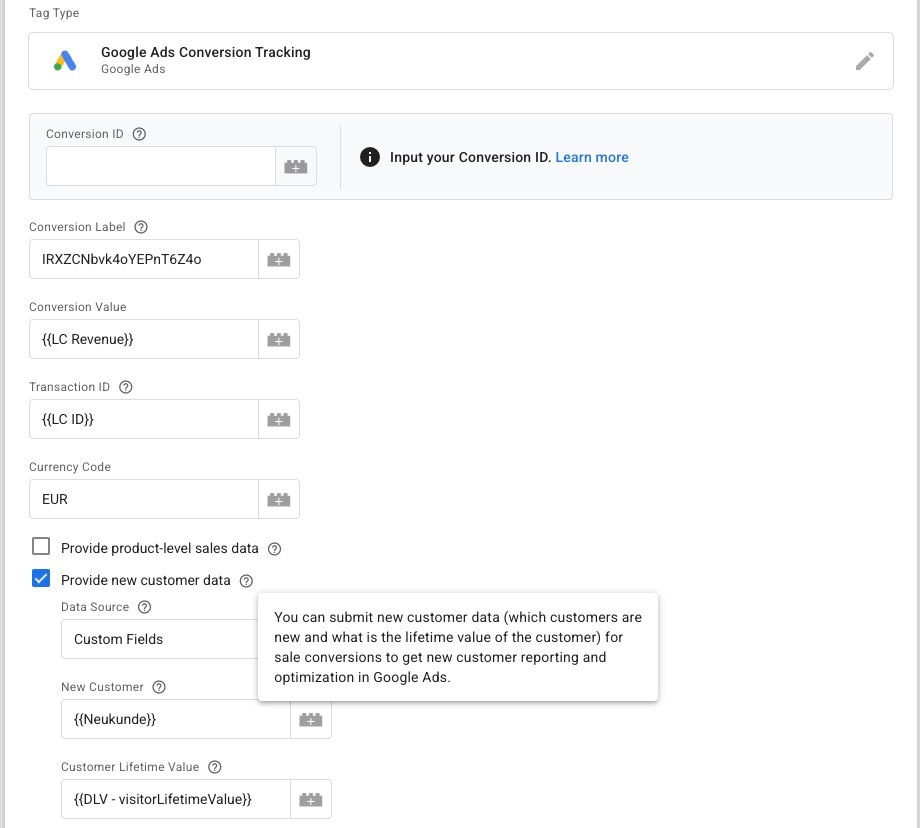
In the Google Ads conversion tag you enable “Provide new customer data” and pass the new-customer value, here via the {{Neukunde}} variable. You can optionally send the customer lifetime value in the same step.
The {{Neukunde}} variable behind it has two parts. First a Data Layer variable reads the value the shop writes at checkout, here visitorHasPlacedOrderBefore with the default “No”.
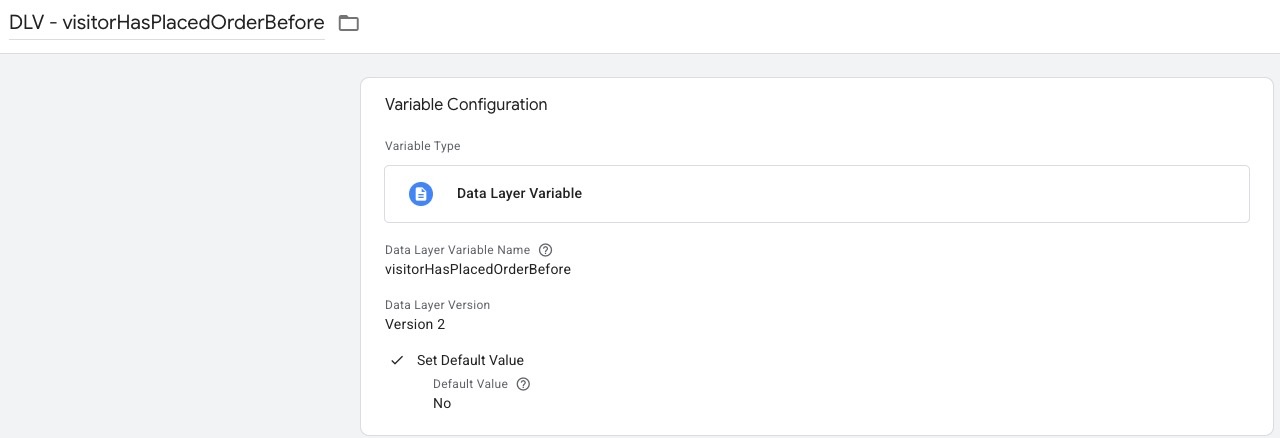
The Data Layer variable reads the information from the shop: has this visitor ordered before? The “No” default kicks in when no value arrives.
A small Custom JavaScript variable then turns that into the new-customer value: it returns true when there’s no prior order.
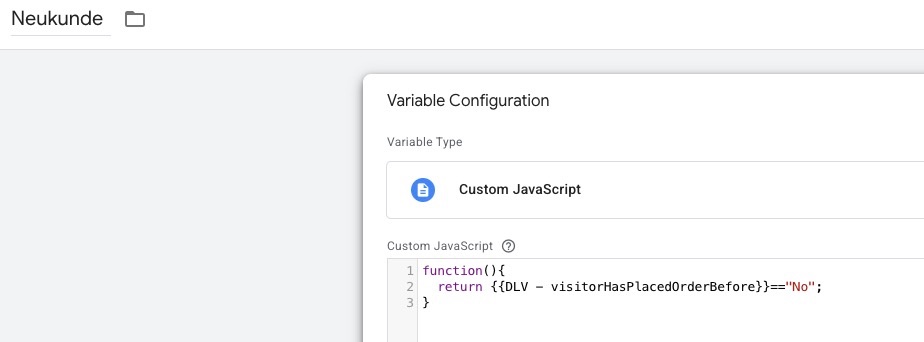
The Custom JavaScript variable Neukunde checks visitorHasPlacedOrderBefore == "No" and produces the true/false that lands in the conversion tag.
If you work directly with gtag instead of GTM, you add the value to the purchase event:
gtag('event', 'purchase', {
  "send_to": "AW-CONVERSION_ID/CONVERSION_LABEL",
  "new_customer": true
});
The parameter is called new_customer and knows three states: true for a new customer, false for a returning one, and no value at all when the information is missing.
One requirement always applies in Europe: you may only track with consent.
Consent Mode v2 makes sure only data from users who opted in flows through. That’s the real difficulty with new-customer tracking, because without consent part of your flags is missing and Google models the rest.
Because Google changes the interfaces and field names now and then, it’s worth checking the current Google documentation on the new-customer parameter before you set this up.
You want more results with Google Ads?
Get a free Google Ads Reality Check: a compact video (about 10 minutes) showing where budget is slipping away in your account and what to change.
Get your Google Ads Reality Check →
Step 2: Make the analysis visible in Google Ads
Once the new_customer value flows, you can segment your conversions in Google Ads by new and returning customers.
In the reporting you then see how many conversions come from new customers and what a new customer costs compared to a returning one. That’s the number you can actually read your growth from, instead of the blended ROAS.
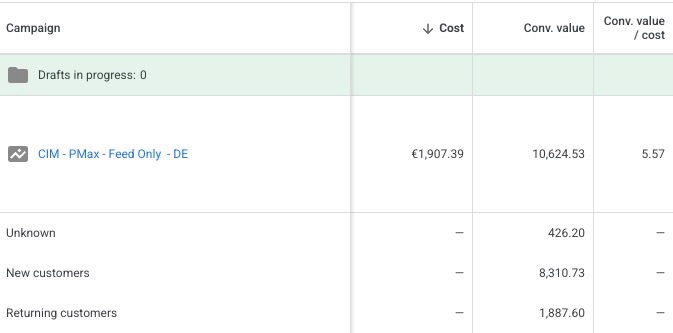
With the signal in place, Google splits the conversion value in the segment: New customers, Returning customers and Unknown. You read directly which share of your revenue comes from new customers.
Important to keep apart: this breakdown in the reporting comes solely from the new_customer parameter. The Customer Match list from the next step does not drive the segmentation.
It improves the accuracy of the detection and is the basis for excluding existing customers and for the new-customer features, but the split in the report itself stands and falls with the parameter.
Once the value is cleanly in place in Google Tag Manager, you have a second option. You can set up a dedicated conversion action that only fires on a new-customer purchase.
Conceptually you tie the trigger in GTM to the condition that the new-customer value is true. That conversion action then counts only new customers. Handy when you want to run new-customer acquisition as its own, clearly separated goal in the account.
Step 3: Set up the Customer Match list
The third step is a Customer Match list of your existing customers. You upload your customer data (email addresses, optionally phone numbers) hashed into Google Ads, and Google matches it against signed-in users.
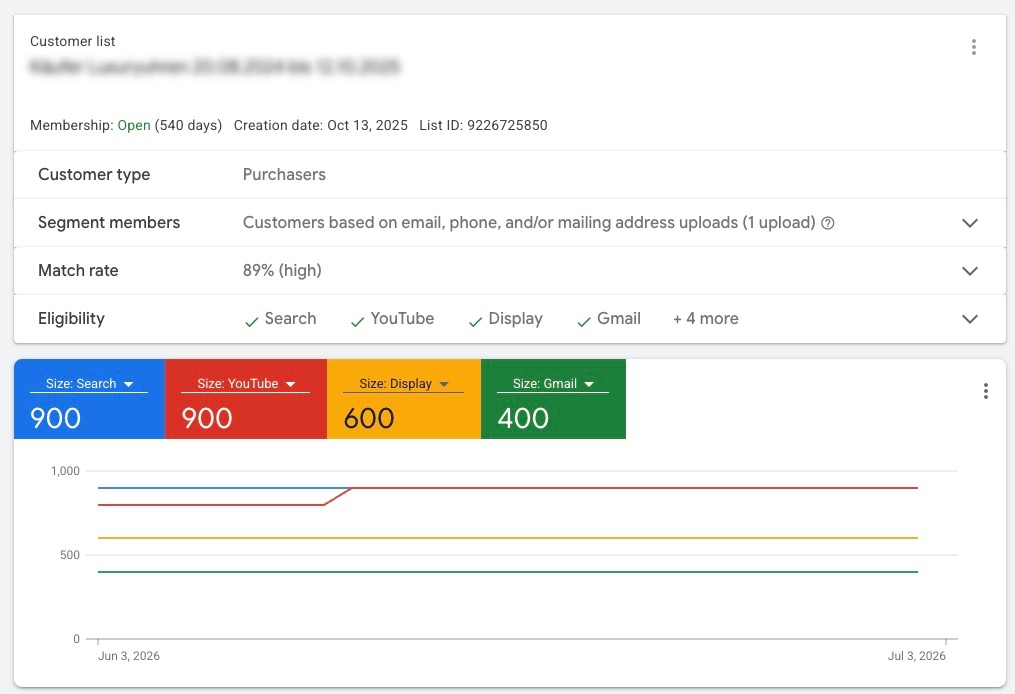
An uploaded Customer Match list of your buyers, here with a match rate of 89 percent. The higher the match rate, the more reliably Google recognizes your existing customers across the networks.
This list serves two purposes.
First it works as an audience signal: you’re telling Google what your typical buyers look like.
Second you can exclude it when you want to target new customers specifically, so your budget doesn’t go to people who already buy from you.
On top of that the list improves the accuracy with which Google separates new from returning customers, and it’s the prerequisite for the features in the next section.
Which features does Google Ads offer for new-customer acquisition?
On top of this data, Google offers its own features to steer bidding toward new customers. There are three variants:
- Bid higher for new customers: Google bids higher on new customers than on existing ones but keeps serving both. For this you set an extra value that a new customer gets on top of their order value. Google’s example is twice the average order value. Available for Search, Performance Max, Shopping and Demand Gen.
- Bid higher for high-value new customers: one level finer. Here Google favors new customers who resemble your most valuable existing customers. Available for Performance Max and Search.
- Only bid for new customers: Google optimizes exclusively for new customers. This only fits a strictly acquisition-capped budget or lead goals, and it requires a separate campaign for existing customers.
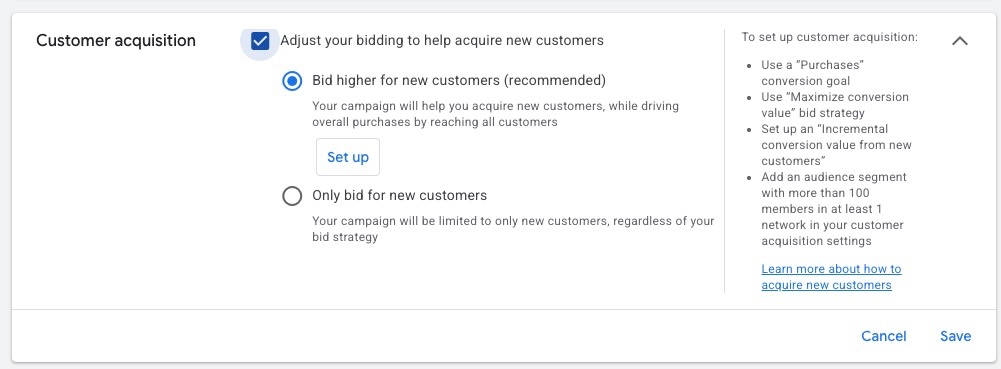
In the campaign settings you choose between “Bid higher for new customers” (recommended) and “Only bid for new customers”. On the right Google shows the requirements for the feature.
For the feature to work, Google requires a few things: a purchase goal (“Purchases”), the “Maximize conversion value” bid strategy, an extra conversion value for new customers, and an audience segment with more than 100 members in at least one network. That closes the loop back to the Customer Match list from the previous step.
An honest assessment: these features are debated in the industry. They’re only as good as the data you feed them.
Feed them a clean own flag and a well-kept Customer Match list, and they can work well. Without that basis, the steering falls back on Google’s automatic detection, and that only knows what happened inside Google.
Technically the features also run without the parameter, via automatic detection and Customer Match, but your own signal raises the accuracy considerably.
What can you do with this distinction?
Once you can evaluate new and returning customers separately, a few options open up. What fits varies a lot from business to business, so these are suggestions, not a recipe.
- With new customers you can deliberately bid more aggressively. The single order can be calculated tighter here, because you’re investing in the customer relationship and not just the first purchase.
- With returning customers you set a stricter bar: every order should be profitable on its own.
- You can show new customers a dedicated offer, say a welcome discount, instead of serving everyone the same ad.
- When it makes sense, you split this into separate campaigns so budget and target value stay cleanly steerable per group.
- Don’t forget existing customers over new-customer acquisition. The profit often sits in the repeat. If you raise customer lifetime value through email and CRM, only the first purchase has to come through the paid channel, the rest runs cheaper over your own channels.
FAQ: New-customer tracking in Google Ads
Do Google’s new-customer features actually deliver?
It’s debated, and the answer hangs on your data quality.
Google itself reports that advertisers using the “Bid higher for new customers” feature with an extra value for new customers of twice the order value improved their ROAS by around 9 percent. For the “Only bid for new customers” feature Google cites an average 11.5 percent higher new-customer rate and 3 percent lower acquisition cost.
Those are Google’s own numbers. In practice they stand and fall with the signal you provide.
Is Google’s automatic new-customer detection enough?
Google can estimate new and returning customers itself, by default over a 540-day window.
The problem is that Google only sees what happened inside Google. A customer who bought for the first time two years ago or came through another channel isn’t recognized reliably.
Your own flag from the shop is more accurate, especially with long purchase cycles.
Do I see the new vs. returning split in the account right away?
The split comes from the new_customer parameter, not from the Customer Match list. Once the value flows cleanly, you can break your conversions down by new and returning customers, and you don’t need the Customer Match list for that.
The bidding feature “Bid higher for new customers” is a different thing. It additionally requires a dedicated value for new customers (the incremental conversion value), a purchase goal, the “Maximize conversion value” bid strategy and an audience segment with more than 100 members.
So don’t mix up reporting and bidding feature: one shows you the split, the other steers on it.
Can I use this despite data protection in Europe?
Yes, but only with consent.
Through Consent Mode v2 only data from users who opted in flows through, and Google models the rest. Part of the flags is missing as a result, which makes the data less complete than in markets without these rules.
Set up cleanly, the approach is still much better than no distinction at all.
Conclusion
Most people see Google Ads as a channel for new customers, and growth almost always comes through new customers.
Still, the standard setup with a ROAS target steers Google toward your existing customers, because that’s the easier way to the target. Don’t leave that to chance.
Three things put you in a position to steer toward new customers deliberately: your own flag in the conversion tag, a well-kept Customer Match list and the right feature in the account.
All of it stands and falls with data quality, and in Europe data protection stays the real limit on what you can measure.
Set that basis cleanly, and you’ll finally see what a new customer really costs, and can point your budget at real growth.
Thanks for reading this far. Good luck putting it into practice!
Work smart with Clicks in Mind
You might also like
 Tracking
 Conversion Adjustments in Google Ads: How to Fix Conversions You've Already Tracked
Conversion adjustments in Google Ads: correct returns, cancellations, and wrong values after the conversion so Smart Bidding bids on real revenue. With a step-by-step guide.
Read more → Tracking
 Advanced Conversion Tracking in Google Ads
Server-side, Enhanced Conversions, cart data, POAS, and conversion adjustments: the advanced conversion-tracking measures in Google Ads, what they bring and how to set them up.
Read more → Tracking
 How to Set Up Enhanced Conversions in Google Ads with GTM
Enhanced Conversions in Google Ads. A step-by-step setup via Google Tag Manager, plus diagnostics and the em-parameter check.
Read more →You want more results with Google Ads?
Get a free Google Ads Reality Check: a compact video (about 10 minutes) showing where budget is slipping away in your account and what to change.
Get your Google Ads Reality Check